How to win back restaurant guests who stopped coming
To win back guests who stopped coming, find them in your guest list, send an offer to their phone, and invite them to book again. Winning back a lapsed guest costs less than finding a new one.
- Offer in the browser, no app
- Same guest profile as the reservation
- You see who came back
- Pick out lapsed guests
- Set a come-back offer
- Send to the phone
- Turn it into a reservation
- Check who came back
- No app
Why do guests stop coming?
Guests usually stop coming with no clear reason — they forget about you, not because they're unhappy. A guest who ate with you every week can drift away in a month when the routine breaks: a vacation, a new job, a new lunch run. Without a reminder, the habit moves to someone else.
- You can't see who stopped coming without guest history
- You have no contact with the guest between visits
- Chasing old guests feels expensive — even though they're cheaper to win back
How do you win back a guest who stopped coming?
To win back guests, follow five steps: pick out the lapsed guests, set a come-back offer, send it to their phone, turn it into a reservation, and check who came back.
- 1
Pick out the lapsed guests
Start in your guest list. You have one profile per guest with visit history, so you can pull everyone who came often but hasn't visited in a set time — for example guests who visited at least three times but not in the last three months.
- 2
Set a come-back offer
Pick a reward that feels like a lot to the guest but costs you little. A small fixed reward — a free dessert or a coffee on the house — beats a big percentage off, because the guest values the free item more than the saved amount. Tie the offer to a quiet day if you can.
- 3
Send it to the guest's phone
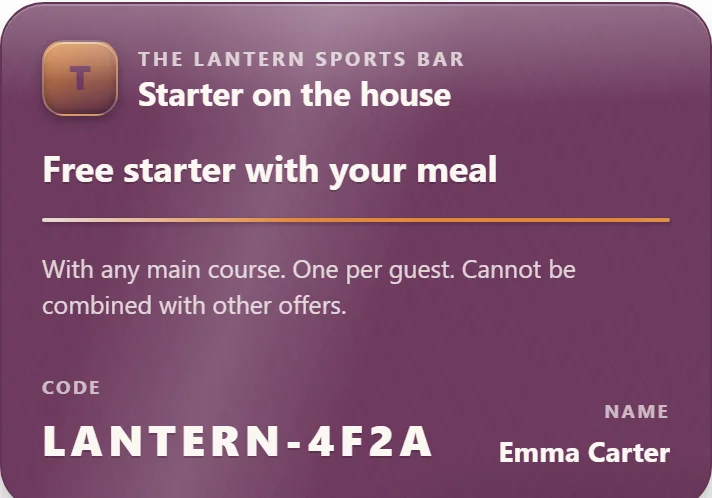
Create the offer and send it straight to the selected guests' phones as a notification. The guest opens it in the phone browser — it shows as a coupon with a code and a QR code, no app to download. Staff scan the code at the register and the coupon is valid once.
- 4
Turn the offer into a reservation
Make the offer lead to a reservation, not just a discount. Because the same guest profile carries both the table and the coupon, you can ask the guest to book a table when they redeem the offer — so the return visit becomes a planned cover you can manage, not a guess.
- 5
Check who came back
Follow up on the send. You see how many guests opened the offer and how many redeemed it at the register, so you know whether the campaign brought guests back or not. Next time you know which offer and which day worked.
From the guest list to the guest who came back — step by step
Click a step and see what data it creates and what happens next. The whole chain is live in the product today.
-
In the guest list you filter out guests who've been in before but not lately — for example the Not visited in 60 days group. Your own guests only, with consent.
-
In the Send view you pick the group and send. Only guests who've opted in to mailings are counted — the consent filter can never be forgotten.
-
The offer opens in the phone's browser with a code and a QR code. Nothing to download — the coupon stays put until it's used.
-
Staff scan the guest's code or enter it at checkout. The coupon is personal and works once.
-
The overview counts per send, and because reservations and loyalty share one guest profile, you see the same guest whether they book a table or redeem an offer.
Three mistakes that make a campaign fall flat
A come-back offer is for guests who stopped coming — not for regulars who already come every week. Send it to everyone and you give a discount to guests who would have come anyway.
- You wait too long — send the offer while the guest still remembers you
- You send it to everyone instead of only those who stopped coming
- The offer leads nowhere — tie it to a reservation
The whole flow in one place
Goboblo keeps guest history, offers, and reservations in one system, so this whole flow happens in one place. You find the guests who stopped coming in your guest list, choose who gets the offer, send it to their phone, and see who redeems it — with no paper card and no app for the guest. The guest opens it in the phone browser with a code and a QR code, staff scan the code at the register, and the coupon is valid once. Because reservations and loyalty share one guest profile, you see the same guest whether they book a table or redeem an offer.
The offer opens in the phone browser, and you choose when to send it. Win-back is one play among several — see more loyalty program ideas and pick the one that fits your restaurant.
What's built today
Expect some to come back, not all of them
A come-back offer reaches guests who already liked you once, so it usually carries more weight than an ad to someone who's never visited. What matters is that you see the result: you know how many opened it and how many came in, and you can adjust the offer next time.
Illustrative worked example: a free dessert worth $6 that pulls back a guest who then spends $25 means you gave away about 24% of that check — but only to a guest who otherwise wouldn't have come at all. The number is an example to show how to do the math, not a result from Goboblo.
Winning back guests is part of a bigger job
Winning back guests is part of a bigger job: getting more guests to come back at all. If you want to run it as an ongoing program instead of a one-off campaign:
Restaurant loyalty programs
Everything about loyalty in one place — guest profile, stamp cards, and coupons in one system.
See the platform →GuideHow to build a restaurant loyalty program
Build the program step by step, from reward to repeat-visit tracking.
Read the guide →LunchLunch coupon for repeat visits
Send a come-back offer as a lunch coupon and fill the weekdays.
Read about lunch coupons →Stamp cardDigital stamp card
Reward every visit, not just this one — a stamp card on the guest's phone.
Read about stamp cards →Want to see how to win back guests?
Book a short demo and we'll show the guest list, the offer, and the register redemption in a real restaurant flow.