How to build a restaurant loyalty program
Five moves turn a one-time diner into a regular: a reward they can reach fast, a card on the phone with no app, a stamp added at checkout on the same guest profile as the reservation, and a number you watch.
- Card on the phone, no app
- 0 commission on your reservations
- Live in a day
You build a restaurant loyalty program in five steps: set a reward guests reach in 5–6 visits, choose a stamp card or points, open the card in the phone browser with no app, tie it to every reservation, then track repeat visits. The card opens on the guest's phone, and the stamp is added at checkout, where staff scan the guest's QR or enter the member number. The stamp card is free until 150 guests use it, and you pay 0 commission on your own reservations.
- Reward
- Format
- On the phone, no app
- Reservation-connected
- Tracking
- Win-back
A loyalty program in five steps
Build the steps in order — each one has a job, and step 4, tying the card to the reservation, is the one most programs skip.
- 1
Set the reward
Work backward from your margin and pick a reward guests reach in 5–6 visits, so the first win feels close from the start.
- 2
Choose a format
A stamp card for frequent lunch visits, points for mixed check sizes. One format, one mechanic a guest reads at a glance.
- 3
Put it on the phone
The card opens in the phone browser and saves to the home screen in one tap — nothing to download, no account.
- 4
Tie it to the reservation
A completed reservation records the visit in the guest profile, so the profile reflects reality. The stamp is added at checkout — staff scan the guest's QR or enter the member number, on the same profile that carries the reservation.
- 5
Promote it and measure
Show the offer when guests reserve and at checkout, set a baseline, and watch repeat-visit rate month over month.
Build your program — and see the guest's card right away
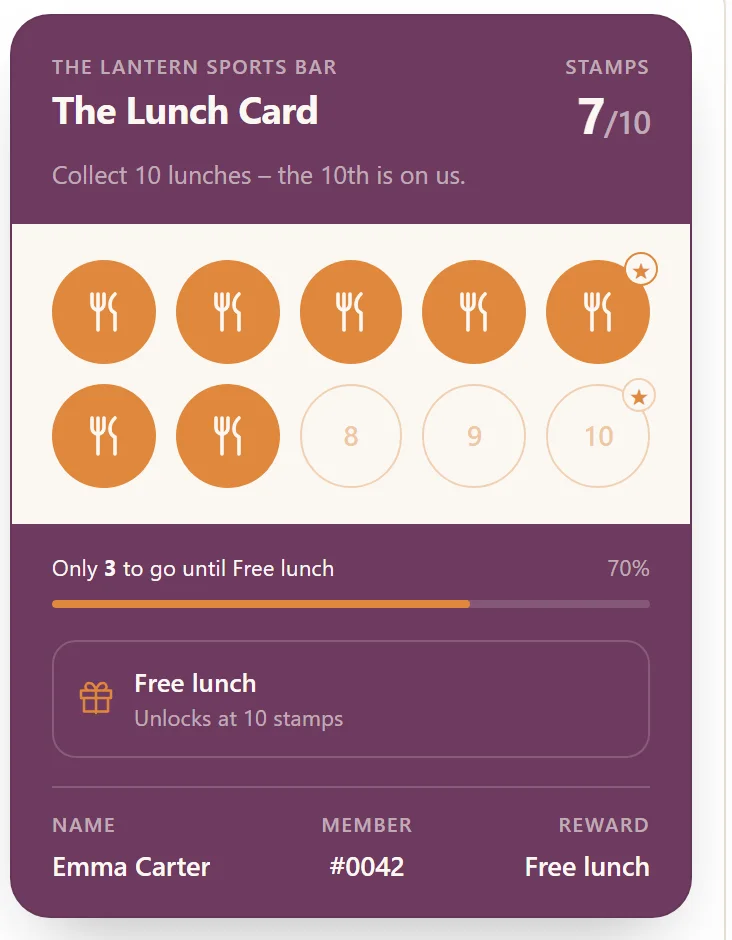
Steps 1 and 2 in practice: pick a reward and how many stamps it takes, and you see the guest's card update on the spot. This is exactly what you set up in Goboblo — and the card opens in the browser, with no app.
- Pick a reward — free lunch, dessert on the house or a free coffee.
- Pick how many stamps it takes: 5 for a fast first win, 10 for a classic card.
- The card you see is the guest's view — the same elements as the real digital stamp card.
Collect 5 lunches – the 5th is on us.
Stamps 3/5Only 2 to go until Free lunch
Collect 10 lunches – the 10th is on us.
Stamps 7/10Only 3 to go until Free lunch
Collect 5 visits – the dessert is on us.
Stamps 3/5Only 2 to go until Dessert on the house
Collect 10 visits – the dessert is on us.
Stamps 7/10Only 3 to go until Dessert on the house
Collect 5 visits – the coffee is on us.
Stamps 3/5Only 2 to go until Free coffee
Collect 10 visits – the coffee is on us.
Stamps 7/10Only 3 to go until Free coffee
The preview mirrors the guest's real card. The stamp is added at checkout — scan the guest's QR or enter the member number.
Set up your card — start for freeA reward guests reach before doubt sets in
Frame the reward as margin on retained revenue, not a giveaway. Put the first win early so momentum carries the guest to the second visit.
- Reachable within 5–6 visits
- Worked backward from your margin
- Stamp card for lunch, perk for dinner
One card on the phone, no app to install
The download step is where most programs bleed people. A card on the phone skips it: the guest taps once to save it to the home screen, and it is already there at the next visit.
- Stamp card or points — pick one
- Opens in the phone browser
- A balance that updates itself
The reservation records the visit, a QR scan adds the stamp
When a guest shows up on a reservation, the system records the visit in the guest profile. At checkout, staff stamp by scanning the guest's QR or entering the member number — one guest profile carries the reservation and the stamp, so the reward follows the guest who actually came in.
- Visit recorded on a completed reservation
- Stamp added the instant staff scan the guest's QR
- Win-back for guests who go quiet
What changes for the restaurant
Same guests, two ways to run the program. Goboblo keeps the reward, the card, and the visit in one flow that mirrors how the guest actually behaves.
- Loose cards lost in a drawer and never stamped
- A separate app that drops guests at install
- Visits that never get recorded, no guest profile
- A launch with no baseline, no one tracking
- A card on the phone, no app
- One tap to join, no account
- A stamp added the instant staff scan the guest's QR
- Repeat visits in a built-in report
One program, free to start
How do you build a restaurant loyalty program?
How long does it take to build a restaurant loyalty program?
Setting it up takes an afternoon: you choose the reward, pick a stamp card or points, and set the earn rate. With loyalty software that opens the card in the phone browser and stamps it when staff scan the guest's QR, the program is live the same day, with no development.
What is a good reward for a stamp card?
A good reward lands within 5–6 visits, so guests feel the first win before doubt sets in. Work backward from your margin: a sixth-visit-free card costs roughly 17% across the six visits and is paid for by visits the guest might never have made.
Do guests need to download an app?
No. The card opens in the phone browser — nothing to download. Guests save it to the home screen in one tap, with no account. The app requirement is where most join rates collapse, so a card on the phone lifts the share of guests who actually join.
How do I connect loyalty to reservations?
A completed reservation records the visit in the guest profile, so it reflects real behavior and you can see who is one visit away from a reward. The stamp is added at checkout, where staff scan the guest's QR or enter the member number — the same guest profile carries both the reservation and the stamp.
What does a restaurant loyalty program cost to run?
A loyalty program usually costs either a flat software fee or a per-guest commission, plus the margin you hand back as rewards. With Goboblo the stamp card is free until 150 guests use it, then $4 a month. Every guest who uses the card counts, and keeps counting — the number only grows. You pay 0 commission on your own reservations, so it gets cheaper per member as repeat visits grow. See pricing.
Where you build and run the program
The five steps above run inside Goboblo's restaurant loyalty program software, which keeps the reward, the card on the phone, the reservation connection, and repeat-visit reporting on one guest profile. You set the reward and the format once, and every visit and every stamp lands on the same profile as the reservation — so the program reflects how the guest actually behaves, with no app for the guest to download. Not sure where to start, browse our restaurant loyalty program ideas and pick the type that fits your restaurant.
Build on the program
The steps above get easier once loyalty shares one guest profile with the rest of the restaurant's flow.
Restaurant loyalty program software
The hub that runs the reward, the card on the phone, the reservation connection, and repeat-visit reporting in one place.
See the platform →LunchRestaurant lunch coupons
The same mechanic pointed at midday, to fill the weekday lunch rush.
Read about lunch coupons →On the phonePhone coupon, explained
How the card works: opens in the phone browser, one tap to save to the home screen, no account, no app to install.
Read about phone coupons →ReservationsRestaurant reservation software
The reservation that records the visit in the guest profile and fills the table in the same flow.
See reservation software →No-showsCut no-shows from the reservation
A reminder tied to the reservation protects covers while it builds the loyalty habit.
Read the no-show playbook →Win-backWin back guests who stopped coming
Once the program is running, you can also bring back guests who drifted away with a targeted offer.
Read how to do it →Launch loyalty in a day, not a quarter
Book a short demo and we will show the reward, the card on the phone, the reservation connection, and repeat-visit reporting in a real restaurant flow.