Restaurant guest profiles
Every guest gets one profile: preferences, allergies, tags, visit history, and no-show score on a single page. It opens with the reservation, so the team greets the guest by name and remembers what they like, before the door even opens.
- One profile per guest
- Preferences and allergies on the reservation
- You own the data

A restaurant guest profile is one page per guest that holds their preferences, allergies, tags, visit history, and no-show score. Every reservation, table, and loyalty stamp writes to the same profile, so the team greets the guest by name and remembers what they like. You own the data, and it is built for you with no extra typing.
- Preferences
- Allergies
- Tags
- Visit history
- Total spend
- No-show score
Try the profile: watch it build — event by event
A guest profile isn't a list you fill in — it builds itself. Click the events in order and watch the guest history panel — the same panel the host opens on the floor — fill up.
- The guest books in the widget — 4 guests at 7:00 PM, with the note gluten allergy in Anything we should know?. The reservation creates the guest profile.
- The guest prepays an experience — the wine tasting for $59. The purchase lands on the same profile, not in a separate POS system.
- Staff save the allergy on the profile — it shows highlighted in a warning color on every future reservation.
- Half a year later the host opens the panel with one click on the guest's name on the floor — and sees the whole picture before the party walks in.
📝 Wants to sit near the big screen
This is how empty the profile is before the first reservation. Click event 1.
The reservation created the guest profile. The row, the party size and the guest's note show up right away — visits count once the visit is done.
The purchase lands on the same profile — the Purchased via Goboblo line. Not in a separate POS system that never talks to the reservation.
The allergy shows highlighted in a warning color every time Anna books. The host can't miss it — the kitchen skips the surprise.
One click on the name on the floor: fifth visit, gluten allergy, sat at table 7 last time, $845 purchased via Goboblo. The whole picture — before the party walks in.
The panel is a copy of the Guest history view in Goboblo — it opens with one click on the guest's name on the map and in the list. The guest's note travels with the reservation; the allergy on the profile is saved by your staff.
See the guest databaseWhat does the guest profile hold?
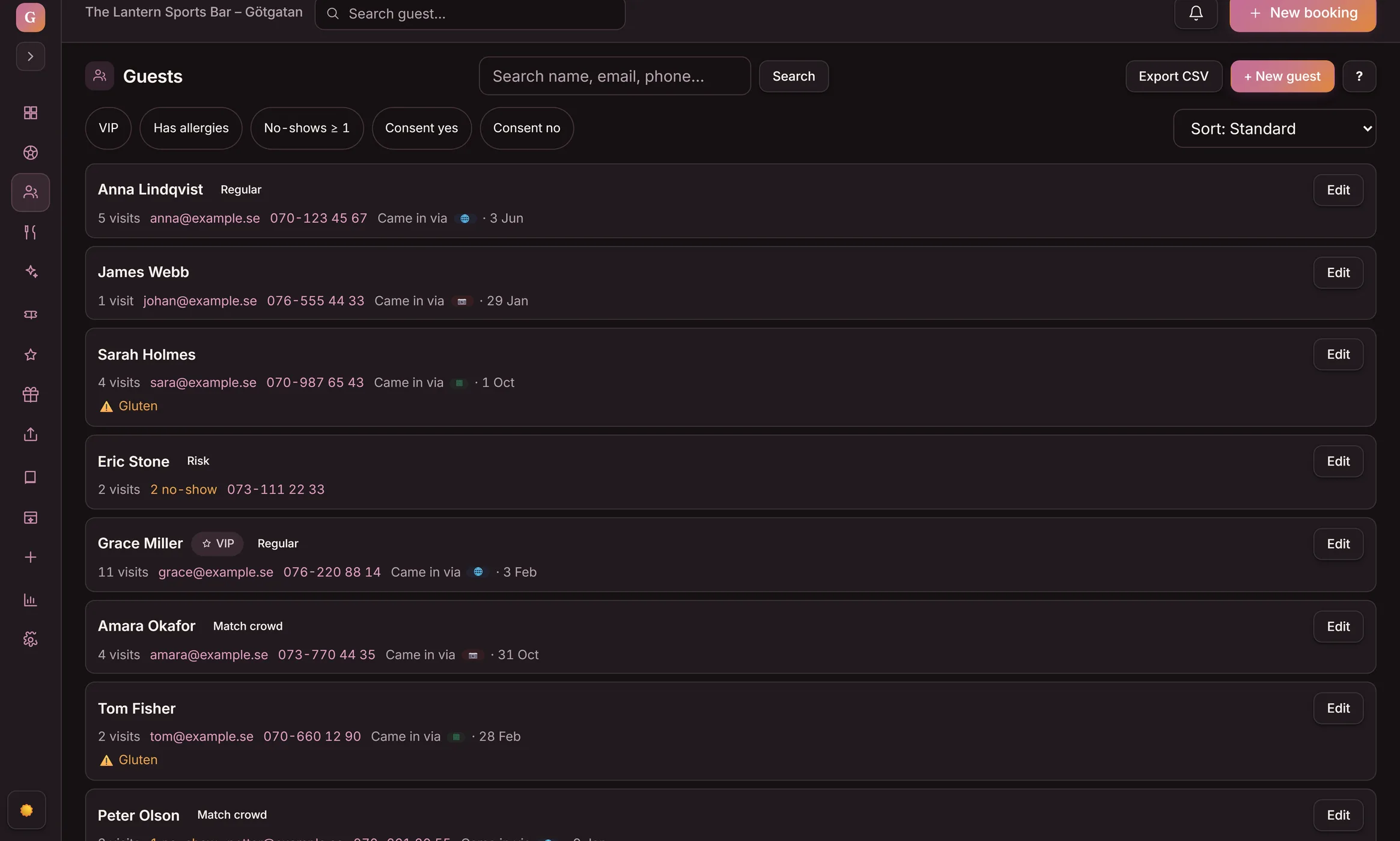
The guest profile keeps a guest's preferences, allergies, dietary needs, tags, and notes on one page. Reservations, tables, and loyalty stamps all write to that same profile, so the team reads the full picture in one place.
- Preferences, allergies, and notes at the top of the profile
- Tags and a VIP flag for your regulars
- One profile per guest — no duplicate records
How does the profile reach the reservation?
The moment a guest books, their profile opens on the screen. A regular's window seat, their nut allergy, and their last visit are there before the team picks up the phone, so the welcome feels personal without anyone digging through notes.
- The profile opens with every reservation
- Allergies flagged before the order is taken
- Last visit and favorite table on the same screen
How does the profile track who turns up?
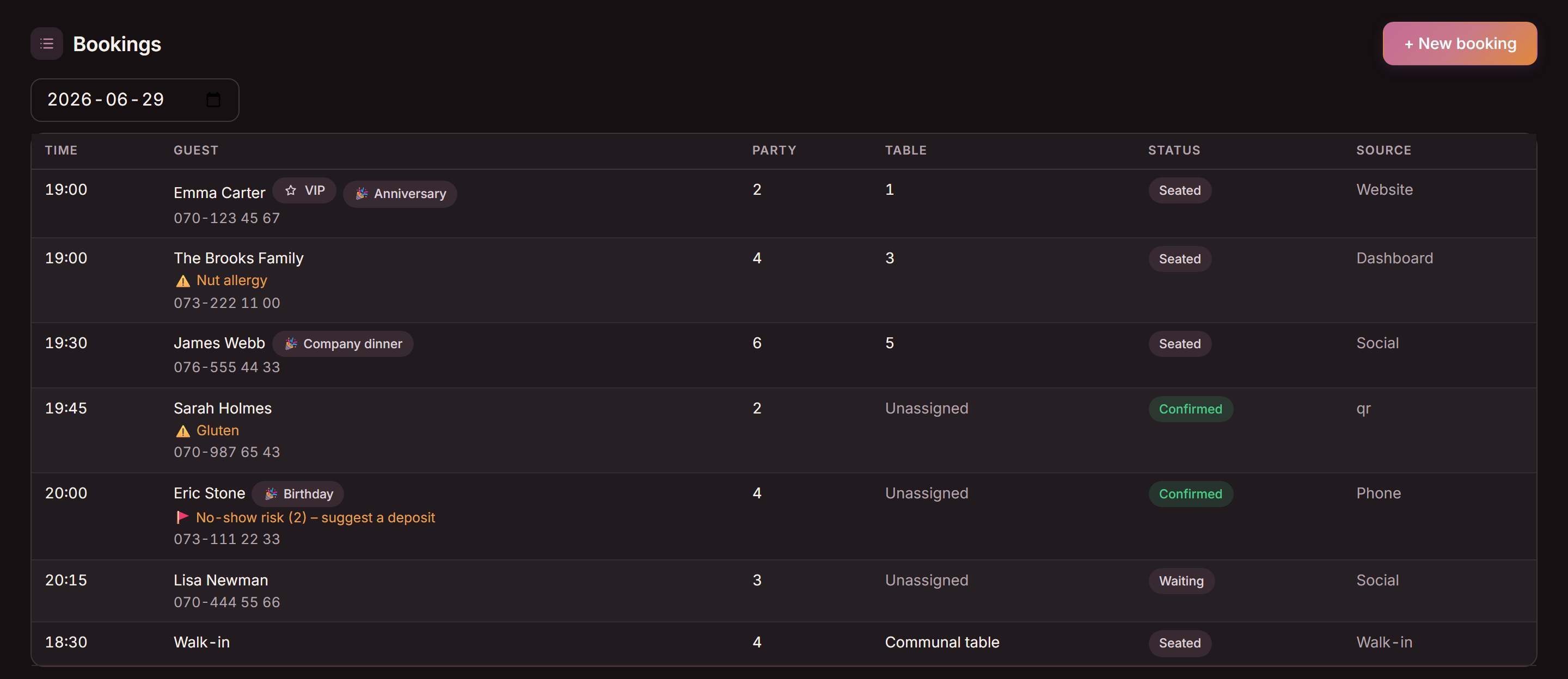
Each profile counts completed visits and no-shows and carries a no-show score. The team sees who the regulars are and who has missed a reservation before, so a full service goes to the guests most likely to show.
- Visit count and total spend on every profile
- No-show count and a no-show score per guest
- Spot regulars and risky reservations at a glance
What do guest profiles change at the door?
The guest profile pulls preferences, allergies, history, and consent onto one record the team works from. The list below sets scattered notes against one live profile on the same Friday service.
- Preferences live in someone's head or a paper book
- Allergies found out at the table, not before
- No idea if a guest is a regular or a repeat no-show
- Guest data spread across reservations, email, and stamps
- One profile per guest the whole team can read
- Allergies flagged on the reservation before they arrive
- Visit count and no-show score on every profile
- Reservations, tables, and loyalty on one record you own
What does the guest profile cover?
What operators ask about guest profiles
What is a restaurant guest profile?
A restaurant guest profile is one record per guest that holds their name, contact details, food preferences, allergies, tags, notes, visit count, total spend, and no-show score. Reservations, tables, and loyalty all write to the same profile, so the team sees the full picture before the guest arrives. See restaurant CRM software for the whole guest record.
Is the guest profile the same as the reservation?
No. The reservation is one visit. The guest profile is everything the restaurant knows about that guest across every visit. The two are tied together: when a guest books, their restaurant reservation software opens their profile, so a regular's window seat and nut allergy are already on the screen.
Where do allergies and preferences show up?
Allergies, dietary needs, and free-text notes sit at the top of the guest profile and on the reservation the moment it lands. The kitchen and the host read the same record, so a guest who cannot have shellfish is flagged before the order is taken, not after.
Does the profile track no-shows and repeat visits?
Yes. Each profile counts completed visits and no-shows and carries a no-show score. The team sees which guests are regulars and which have missed reservations before, so a busy Saturday night goes to the guests most likely to turn up.
Do guests need an app or an account?
No. Guests do not log in and do not need an app. The profile is built from their reservations and visits, and it stays inside your restaurant. You hold the marketing consent on the same record, so you only message the guests who said yes.
Want to see a guest profile on your restaurant?
Book a short demo and we'll show a guest profile live: preferences, allergies, tags, visit history, and no-show score, all opening with the reservation.