Restaurant event booking: sell paid seats to your experiences
Create an experience or event with a fixed price per seat, take payment up front when the guest books, and see the guest list per sitting. The money is in before the night starts.
- Paid up front, per seat
- 0.5% on the seat portion
- No overselling
An experience in Goboblo is a sitting with a fixed price per seat that the guest books and pays for up front. You set the price, the number of seats and the time, and you see the guest list per sitting. The money is in before the night starts, and you never set up a paid event and face empty chairs.
- Tasting menu
- Wine tasting
- Quiz night
- Christmas buffet
- New Year's dinner
- Theme night
Book the last seats — and watch capacity protection close the night
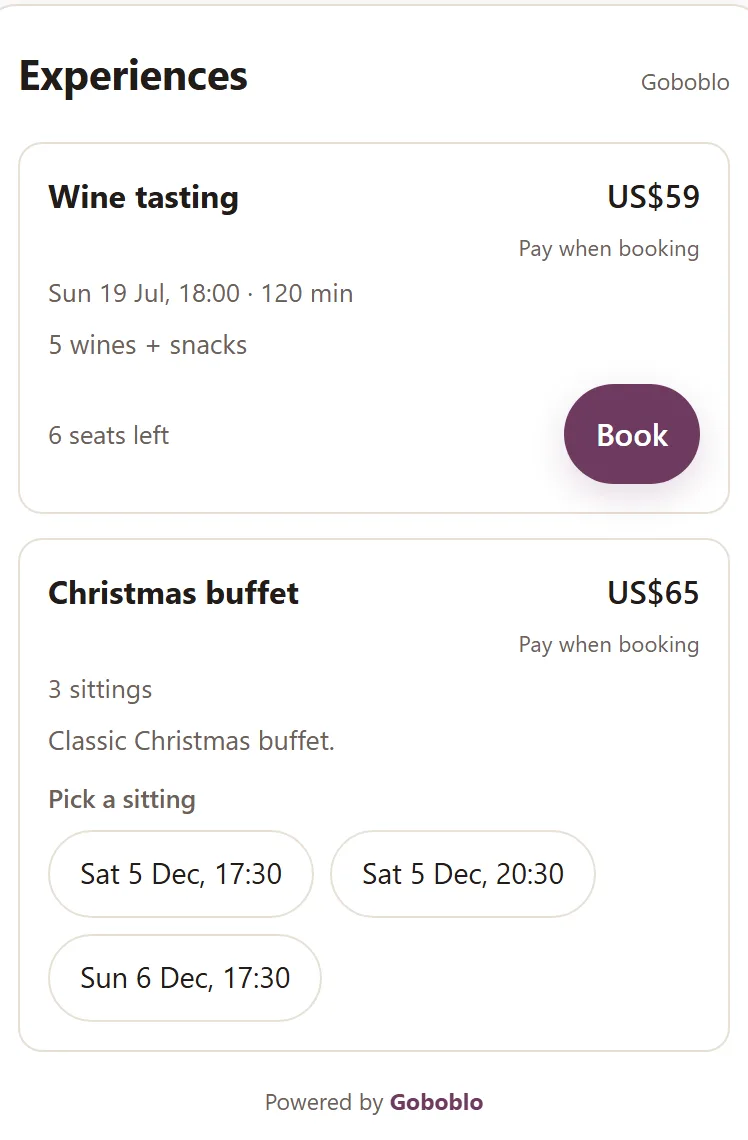
This is the guest's view with the demo location's real values: the wine tasting has 6 seats left. Book like the guest — two seats at a time — and see what happens when the last one sells.
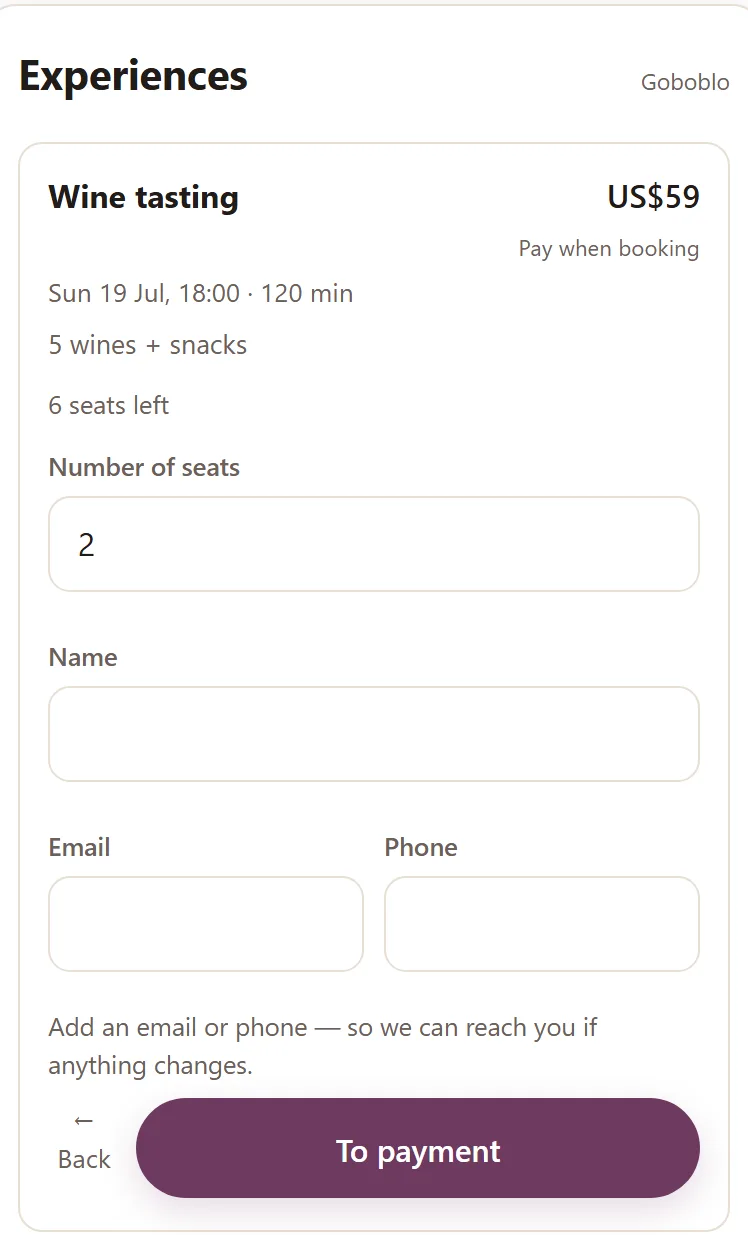
- The guest picks a sitting and taps Book — number of seats, a name and one way to reach them.
- The guest pays for their seat by card (Stripe) — the money goes straight to your own Stripe account.
- The seats count down with every reservation, and the guest lands on the sitting's guest list.
- At zero, capacity protection closes the sitting: the guest sees Sold out, and you can't sell more seats than you have.
Sun, Jul 19 · 6:00 PM · 120 min
5 wines + snacks
Filled in for you in the demo — the guest types their own.
The card payment (Stripe) is skipped here in the demo.
- Every seat was paid up front — the money went through Stripe straight to your account. Goboblo takes 0.5% on the seat portion; Stripe's card fee is charged to your own account like any card terminal.
- Capacity protection counted 6 → 0 and closed the sitting — no overselling, no double-booked chair.
- The sitting's guest list filled up the same second — you see who's coming, ready before the night.
What is an experience in Goboblo?
An experience is a sitting with three things set in advance: a price per seat, a number of seats, and a time. The guest buys a seat instead of just booking a table, and you know what the night is worth as it fills. A wine tasting, a tasting menu, a quiz night or a Christmas buffet — anything the guest pays to be part of.
Experiences run on the same backbone as your ordinary restaurant reservation software — same calendar, same guests, same overview. The difference is that an experience has a price and a seat count, so the guest pays for their seat instead of booking free. Ordinary table reservations stay in the reservation system; experiences come in when you want to sell a whole night in advance.
Take payment when the guest books, not when the guest shows up
When you set a price per seat, the guest pays by card right in the reservation view. You choose whether the guest pays the full amount or just a deposit — you take the rest at the door. The payment runs through Stripe straight into your own account. Goboblo takes 0.5% on the seat portion. Stripe's card fee is charged to your own Stripe account, just like any card terminal. The money is yours before the night starts.
- The guest pays for their seat by card when they book
- The full amount or a deposit — you decide per experience
- The money goes straight to your own Stripe account
- Goboblo takes 0.5% on the seat portion — Stripe's card fee like any card terminal
Build the whole season and see what each night brought in
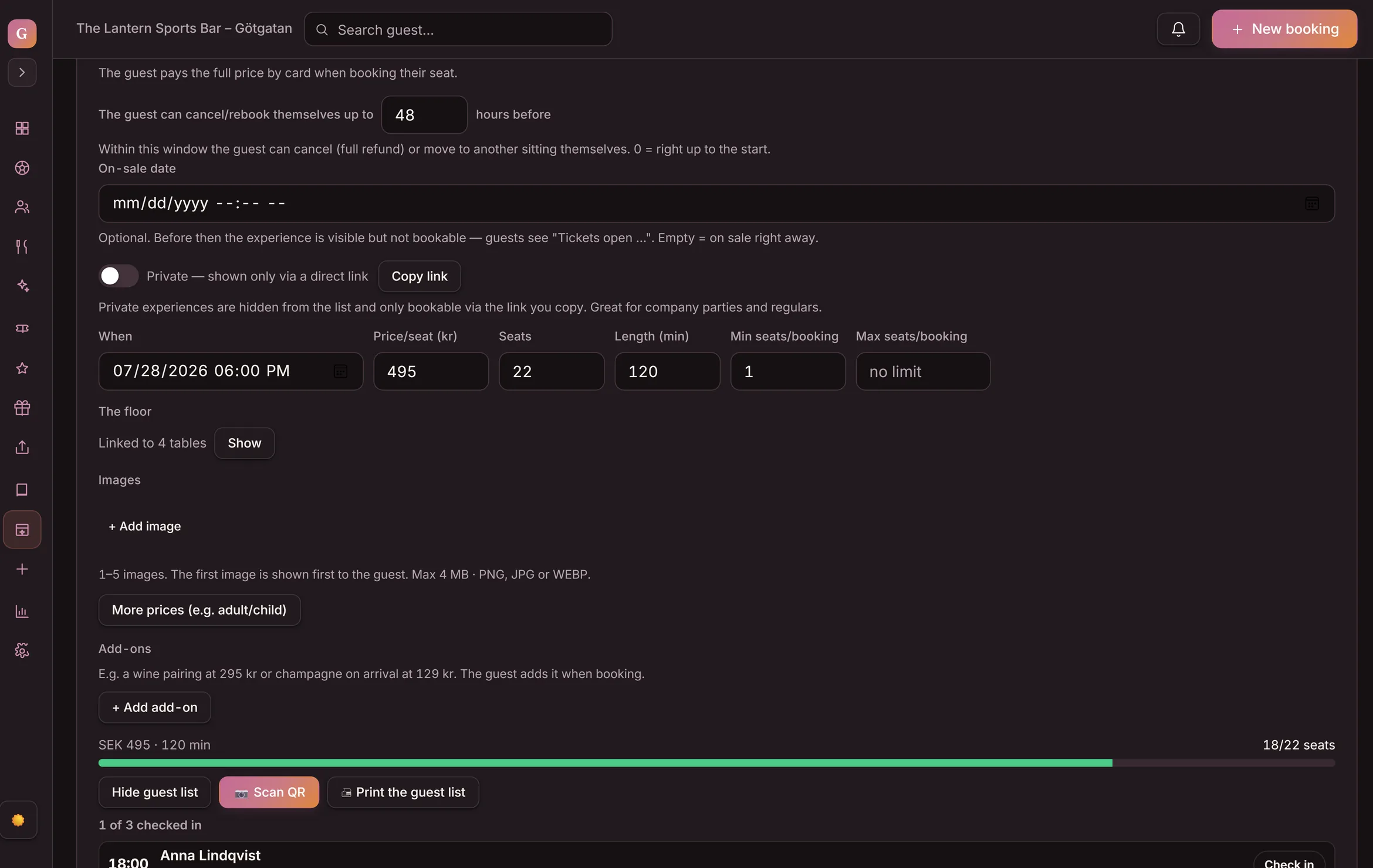
With Create a season package you build a whole series of sittings in one go. Pick dates, weekdays and times, and every sitting is created at once — up to 100 at a time, shown in a calendar view. Change the price or a time and you edit the whole series in one go instead of one night at a time. After the night you see the revenue, the fill rate per sitting and how much the extras sold.
- Dates × weekdays × times → every sitting created at once
- A calendar view of the whole series — up to 100 sittings
- Edit price, time or capacity for the whole series at once
- Stats per sitting: revenue, fill rate and extras sold — plus a printable guest list
Different prices and extras on the same sitting
An experience can have several prices on the same sitting — for example Adult and Child — so the party picks the right seat for each person. Want to sell more per reservation? Add extras the guest checks when they book, like an extra wine pairing or a bottle to take home. The seat price and the extras are paid in one card payment, and the guest sees their total before they pay. Goboblo's 0.5% fee is charged on the seat portion.
- Several prices per sitting. For example Adult and Child — the guest picks.
- Extras. The guest checks add-ons and pays for everything in one purchase.
- One total. The guest sees what the seat and extras cost before they pay.
- Extras sold show up in the stats per sitting.

The guest rebooks, cancels and joins the waitlist on their own
Every guest gets their own link to their reservation. There they move to another sitting or cancel on their own — as long as it's before the deadline you set. If a sitting is full, the guest can join the waitlist; when a seat opens up, the first in line is notified automatically and can take it. Everyone gets a reminder before the night, so fewer forget they booked. You skip the back-and-forth emails and phone calls.
- Rebook or cancel on their own. The guest handles it via their link, up to your deadline.
- Waitlist. When a seat opens, the first in line is notified automatically and can take it.
- A reminder before the sitting. Fewer forgotten reservations and empty chairs.
- Less admin. No email and phone ping-pong about changes.

Gift an experience and check the guest in at the door
A paid experience can be given as a gift — the recipient gets it by email and books themselves onto a sitting. When the night comes, you check each guest in with a QR code at the door, so you see straight away who's in.
- Give as a gift. A paid experience is emailed to the recipient, who books themselves in.
- QR check-in at the door. Scan the guest and see who's arrived.
- Gifting needs your Stripe payouts switched on.
From a set table to a paid guest list — step by step
Click a step to see what data it creates and what happens next. The whole chain is live in the product today.
-
Name, description, price per seat, seat count and when it happens. A wine tasting for 24 takes a minute to set up. Free experiences work the same way — without the payment step.
-
Create a season package: dates, weekdays and times → the whole Christmas series is created at once. Change the price and you edit the whole series in one go.
-
The guest picks a sitting on their phone, sets the number of seats and pays by card. The money runs through Stripe straight to your own account — you never send an invoice.
-
Every reservation takes its seats off the sitting. The guest always sees how many are left — and you see the fill rate per sitting in the dashboard.
-
When the last seat sells, the guest view shows Sold out and the book button disappears. You can't sell more seats than you have — no overselling, no double-booked chair.
-
You see who's coming to which sitting, with payment settled. Every guest gets a reminder before the sitting, and at the door you check each one in with a QR code. No binders, no invoices — just a set table with sold seats.
On an experience the guest buys a seat, not a specific table. If you want guests to choose a table when booking on ordinary table reservations, you add that step in the reservation widget instead.
Sold seats and money in — before the night starts
What can you sell as an experience?
Experiences fit anything you set the table for and charge for in advance. Here are a few nights operators sell this way.
- Christmas buffet. Sell every sitting with a price per cover and payment up front.
- New Year's dinner. One set menu, one set price, the seats sold well ahead.
- Crayfish party. A seasonal night with a fixed number of seats per table.
- Wine tasting and tasting menus. Paid seats, guest list ready before the night.
- Quiz and theme nights. Charge per participant and know exactly how many are coming.
Who are experiences for?
Experiences fit you if you'd rather sell a whole night in advance than hope the tables fill.
- You run recurring events. Christmas buffets, quiz nights or tastings that come back.
- You want the money before the night. Prepayment per seat instead of drop-offs and empty chairs.
- You sell a set menu at a set price. Tasting menu, New Year's dinner, theme night.
- You want to skip invoices and binders. The guest books, pays and lands on the guest list on their own.
More ways to take payment in advance
Experiences are one way to get money in before the guest arrives. If you'd rather sell a present the guest redeems later, gift cards work the same way — money up front, a visit in the future. See how it all fits together among Goboblo's features.
Experiences are part of Goboblo's reservation system, which is free to start. On paid experiences we take 0.5% on the seat portion, and the rest goes straight to your own account. Book a demo and we'll show you how to create your first experience and the season package for next season.
What operators usually ask about experiences
Can the guest book and pay on their own?
Yes. The guest picks a sitting, pays for their seat by card right in the reservation view and gets a confirmation. The payment runs through Stripe straight into your own account, and the guest lands on that night's guest list.
What does it cost?
You start free. On paid experiences Goboblo takes 0.5% on the seat portion — the rest goes straight to your Stripe account. Free experiences cost nothing and book without payment. See more features.
Does the experience have to cost money?
No. You can create a free experience — the guest books their seat without paying, and you still get the guest list and the capacity protection. Payment switches on the moment you set a price per seat.
What happens when a sitting sells out?
Goboblo counts the seats down and closes the sitting when it's full, so you never sell more seats than you have. The guest sees Sold out instead of the book button and can join the waitlist. When a seat opens up, the first in line is notified automatically and can take it. Every sitting has its own guest list.
Can the guest rebook or cancel on their own?
Yes. Every guest gets their own link to their reservation. There they move to another sitting or cancel on their own, as long as it's before the deadline you set. If a guest cancels a paid seat, you make the refund in your Stripe account, just like any other card payment — you set your own terms.
Can I have different prices, like child and adult?
Yes. A sitting can have several prices — for example Adult and Child — so the party picks the right seat for each person. You can also add extras the guest checks and pays for in the same purchase. Seat and extras are paid in one card payment, and the guest sees their total before they pay.
Can the guest pay a deposit instead of the full amount?
Yes. You choose whether the guest pays the full amount when they book or just a deposit — then you take the rest at the door. Either way the payment runs through Stripe straight into your own account.
Can a guest gift an experience?
Yes, on paid experiences. The recipient gets the gift by email and books themselves onto a sitting. To sell gifts, your Stripe payouts need to be switched on.
How do I check guests in on the night?
You scan the guest's QR code at the door and see straight away who's in. Every guest also gets a reminder before the sitting, so fewer forget they booked.
Can I create a whole season at once?
Yes. With Create a season package you pick dates, weekdays and times, and the whole series of sittings is created in one go (up to 100), shown in a calendar view. Change the price or time and you edit the whole series in one go.
What do I see afterwards?
After the night you see the revenue, the fill rate per sitting and how much the extras sold. You print the guest list and take it to the kitchen or the door.
Want to sell your next night in advance?
Book a short demo and we'll show you how to create an experience with a price per seat, take payment up front, and build the whole season with season packages.