Restaurant reservation widget: let guests book a table on your own site
Add a book-a-table button to your own website so guests book straight from you — no marketplace and no commission on your own reservations. The guest sees your open times live, and the reservation stays with you.
- Added with a link or a line of code
- 0 commission on your own reservations
- Works on mobile
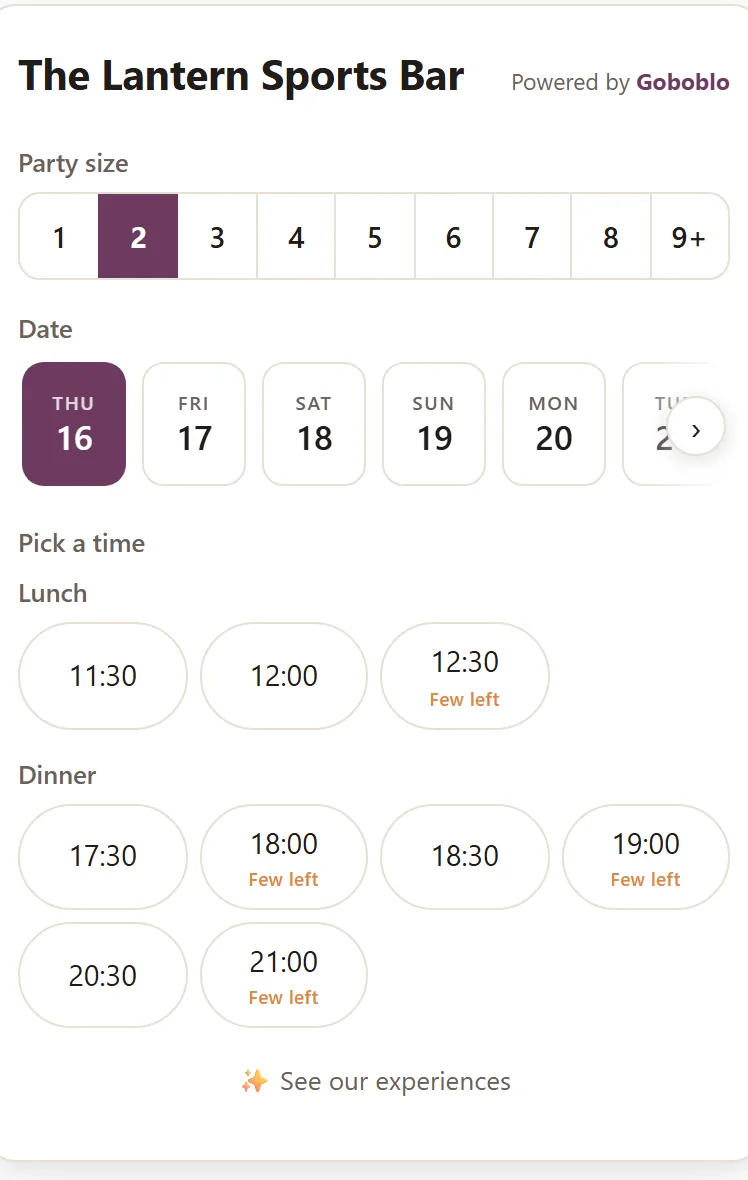
A restaurant reservation widget is a reservation button you add to your own website so guests book a table straight from you — without going through a marketplace. The guest sees your open times and books right there, on your page. The reservation and the guest's details stay with you, not a middleman.
The widget is part of Goboblo's restaurant reservation software. The difference from the whole system is simple: this is the button and form you put where guests already are — on your website, in your Instagram bio and in your Google profile — so a guest who just found you can book in seconds instead of hunting for a phone number.
- Your own site
- Instagram bio
- Google profile
- A site from us
- Live times
- Waitlist
- 0 commission
Book a table — the guest's three clicks, from time to confirmed
This is the widget with the demo location's real times. Pick a party size and a time, confirm — and see what happens in your system when the guest is done.
- The guest picks a party size, a date and an open time — times that are filling up are marked Few left.
- The guest fills in a name and one way to reach them on the details step — and can pick a table or join the waitlist where it fits.
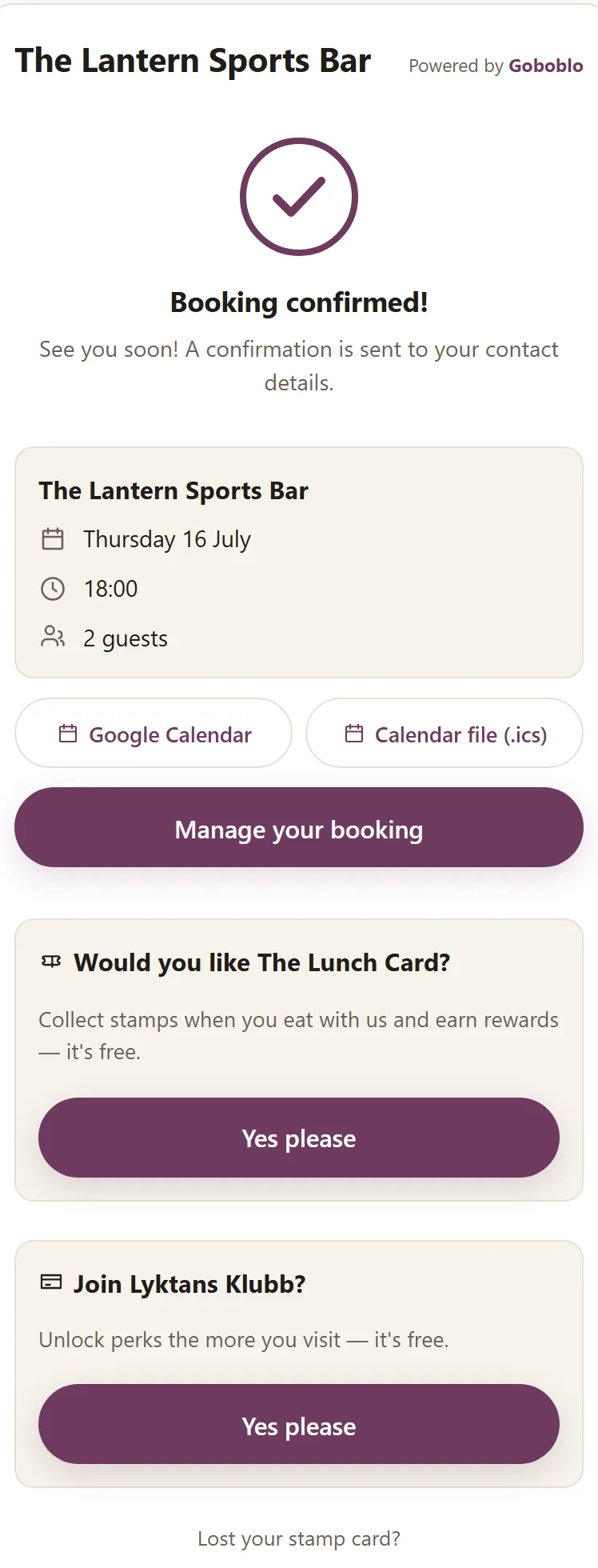
- Confirm reservation: the guest gets Reservation confirmed! with a calendar file and a manage link to change or cancel on their own.
- The reservation sits in your system the same second — with a guest profile, and nobody picked up a phone.
Thu 16 July · · 2 guests
Filled in for you in the demo — the guest types their own.
See you soon! A confirmation is sent to your contact details.
- The reservation landed in your reservation system the same second — in the calendar and on the floor, no phone.
- The guest got a confirmation with a calendar file and a manage link — they change or cancel on their own, in four languages.
- A guest profile was created — next time you recognize Emma, and the reservation counts toward her history.
Add the widget without rebuilding your site
You add the widget by pasting a link or a short line of code onto your page — much like embedding a map or a video. No site rebuild, no developer needed.
- Works on WordPress, Wix, Squarespace and custom sites
- No rebuild of your website
- The same widget for every location you run
Put the book-a-table button where guests find you
Put the button on your website, the reservation link in your Instagram and Facebook bio and in your Google Business Profile. No website? We build one for you with the button already on it. A guest who just read about you can book in seconds instead of hunting for a phone number.
- On your website — the guest stays on your page
- In your Instagram and Facebook bio
- In your Google Business Profile, straight from the search result
- Or on a website we build for you
Confirmed in a second — and the guest handles the rest
Once the guest confirms, Reservation confirmed! appears with calendar buttons and a manage link where the guest changes the time, the party size or cancels on their own — in four languages. Right on the confirmation the guest can also say yes to your stamp card or membership, so a reserved table becomes the start of a regular.
- Confirmation with Google Calendar and a calendar file
- The guest changes or cancels via the manage link
- Stamp card and membership offered right on the confirmation
From your bio to a confirmed reservation — step by step
Click a step to see what data it creates and what happens next. The whole chain is live in the product today.
-
A link or a line of code on your site, in your Instagram/Facebook bio and in your Google Business Profile. No rebuild, no developer.
-
The widget counts out tables that are already reserved and marks times that are filling up with Few left. The guest can never double-book.
-
Party size, time and contact details — three clicks, around the clock, even when nobody answers the phone. Where it fits, the guest picks a table or joins the waitlist when everything is full.
-
The guest gets Reservation confirmed! with a calendar file and a link to change the time, the party size or cancel — in English, Swedish, Norwegian or Danish. Fewer calls mid-service.
-
The reservation shows up in your team's view right away, on the right table at the right time. The guest gets a profile — history, visits and loyalty in one place.
-
Right on the confirmation screen the guest can say yes to your stamp card or membership — no app, no account. A reserved table becomes the start of a repeat visit.
Who pays, and who owns the guest afterwards?
Both your own widget and a marketplace give the guest a button to book with. The difference is who pays, and who the guest belongs to afterwards.
- The guest books in the marketplace's app and on their page
- A fee per guest for reservations through the network
- The guest partly belongs to the marketplace — gets suggestions for other places
- The traffic runs through the marketplace
- The guest books on your own site, in your bio and in your Google profile
- A flat fee, 0 commission on your own reservations
- The guest's details land in your own guest profile
- The traffic is yours — the guest stays on your page
Wired into the whole reservation system, not a loose form
Own the guest instead of paying per reservation
A marketplace has one strength your own widget can't match: it helps new diners discover you. If you just want to show up for people browsing a big app, the per-guest fee can be worth it. But for every guest who has already found you — through your site, your account or a tip — your own widget is both cheaper and yours. Weighing the two, see TheFork alternatives.
The reservation widget is part of Goboblo's reservation system, which is free to start: up to 25 reservations per month per location, no card. When you outgrow that, you upgrade to unlimited for $29 a month per location, with the first month free and the price locked. On your own reservations we take 0 commission. See pricing or book a demo, and we'll show you how to add the widget to your site and your bio.
Who is the reservation widget for?
The reservation widget fits you if you want to take reservations where guests already are, and own them afterwards. It's especially good for four kinds of operation.
- You have your own website or Instagram profile. Guests book from there without calling.
- You want to own your guests and your guest data. Instead of paying per reservation on a marketplace.
- You run a restaurant, bar or lunch spot. Take reservations around the clock, even when nobody answers the phone.
- You want to get going fast. Without rebuilding the site or hiring a developer.
Run several locations? The same widget works for each one — every place has its own times and its own tables. No page to put the button on? Our restaurant website builder builds the site for you, with the widget already on it and your own domain.
What operators usually ask about the reservation widget
What is a restaurant reservation widget?
A restaurant reservation widget is a reservation button you add to your own website so guests book a table straight from you, without going through a marketplace. The guest sees your open times and books on your page, and the reservation lands in your reservation software.
How do I add the widget to my site?
You paste a link or a short line of code onto your page — much like embedding a map. It works on WordPress, Wix, Squarespace and custom sites, and you don't need to be a developer.
Can guests book from Instagram or Google?
Yes. Put the reservation link in your Instagram or Facebook bio, or in your Google Business Profile, and the guest can book straight from there.
How is the widget different from a marketplace like TheFork?
On your own widget you pay a flat fee and no commission on your own reservations, and the guest is yours. On a marketplace you pay a fee per guest, and the guest partly belongs to the marketplace. A marketplace does help new guests discover you — see the comparison.
What does it cost?
You start free: up to 25 reservations per month per location, no card. Then $29/month per location for unlimited, with the first month free and the price locked. See pricing.
Can the guest change or cancel on their own?
Yes. The confirmation holds a link where the guest changes the time, changes the party size or cancels themselves, in English, Swedish, Norwegian or Danish. That means fewer calls mid-service.
Want the book-a-table button on your site?
Book a short demo and we'll show you how to add the widget to your site and your bio — and how the reservation lands in the same system as the waitlist and guest profiles.