Multi-location restaurant software

Every venue in one account. Same price per venue.

Goboblo is multi-location restaurant software: every venue in one account, and each venue has its own booking widget, opening hours and plan. The guest database is shared, but staff see only the guests at their venues. You add new venues yourself. Free up to 25 bookings a month per venue.

  • Free up to 25 bookings per venue
  • Same price per venue
  • Add a venue yourself
All venues

Every venue on one screen

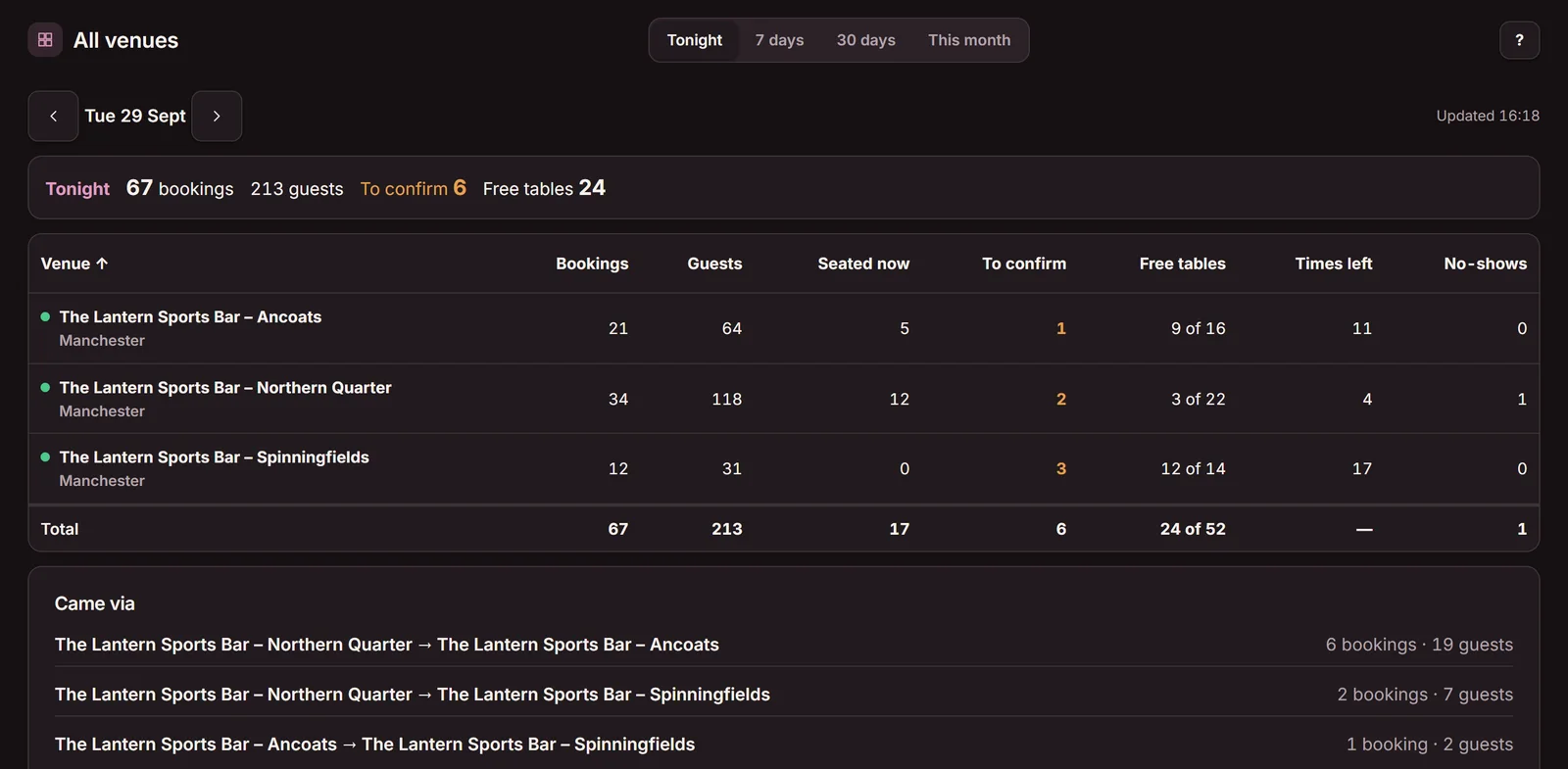
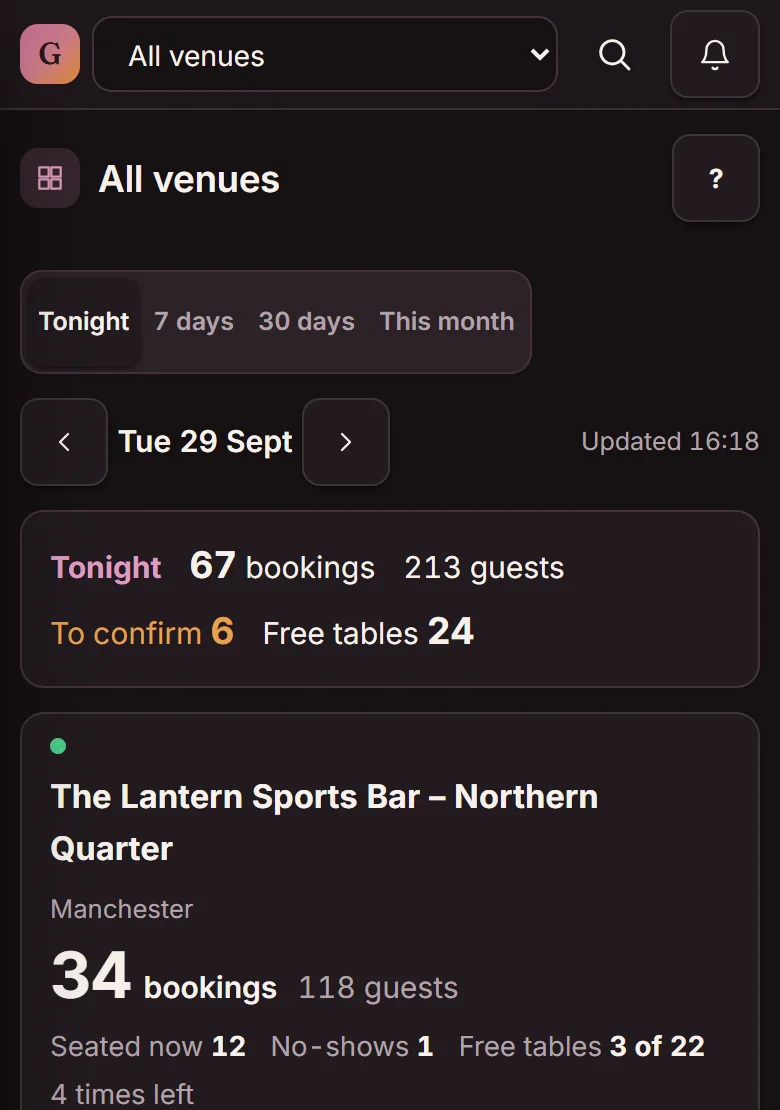
The “All venues” overview shows tonight's bookings, guests, free tables and times left, per venue and in total. Tap a venue to open its own view.

The All venues overview in Goboblo for The Lantern Sports Bar in Manchester: Ancoats, Northern Quarter and Spinningfields with tonight's bookings, guests, free tables and times left per venue and in total, and the Came via table (demo) The All venues overview on a phone: tonight's total of 67 bookings and 213 guests, then one card per venue with bookings, guests and free tables (demo)

On mobile: tonight's total and one card per venue

  1. The whole account tonightBookings, guests and free tables — the total for all your venues.
  2. One row per venueBookings, guests, who is seated now and what is waiting to be confirmed.
  3. Free tables and times leftSo you see where there is space before a guest asks.
  4. “Came via”Bookings guests made through another venue's booking widget.

On a computer you also see “Came via”: bookings guests made through another venue's booking widget.

Add a venue

Add a venue yourself

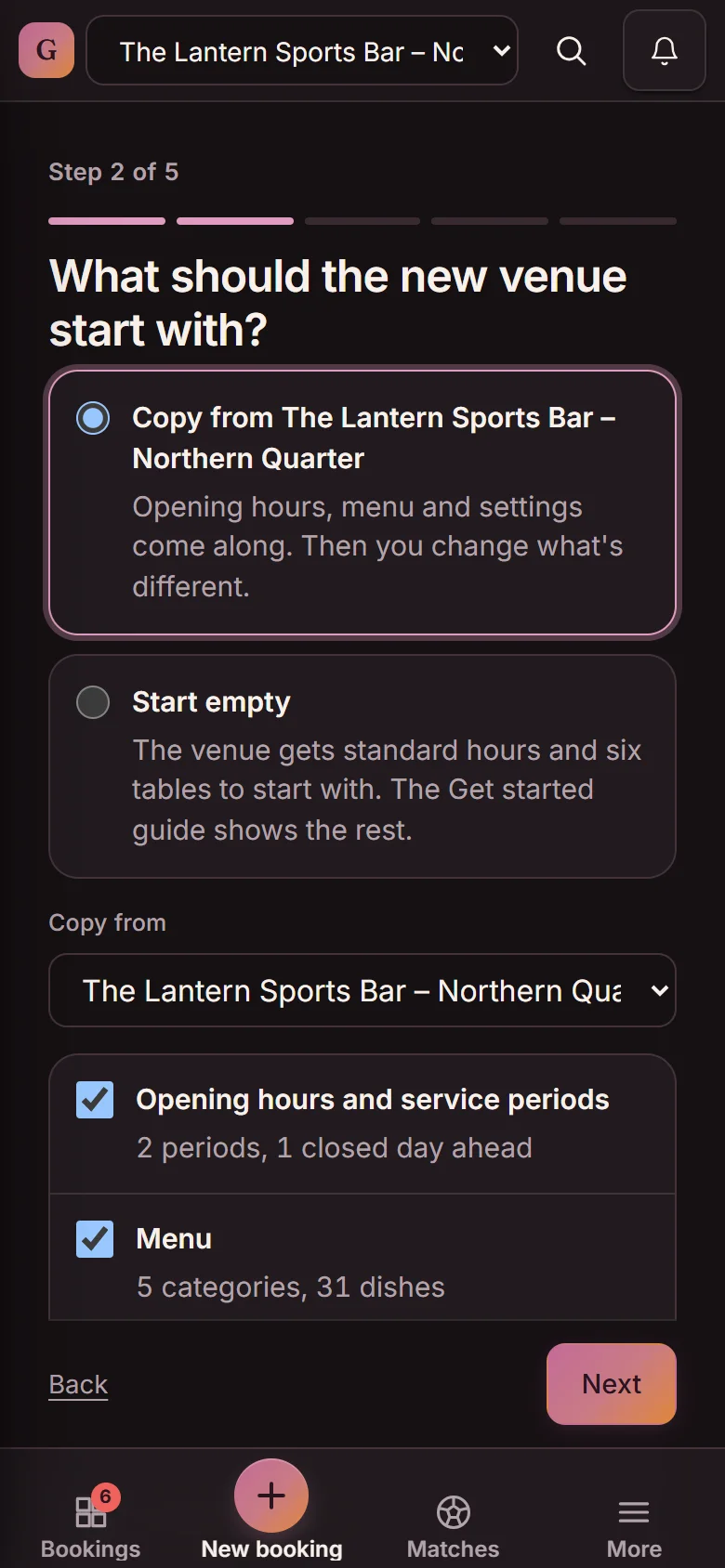
You add a venue in five steps and see the price before you confirm. Opening hours, menu, booking questions, messages to guests, the widget's look and settings can be copied from a venue you already have. You draw the floor plan yourself, because every venue is laid out differently.

Add a venue, step 2 of 5: What should the new venue start with? Copy from The Lantern Sports Bar – Northern Quarter, with Hours and service periods (2 periods, 1 closed day ahead) and Menu ticked (demo)
Step 2 — copy from a venue you already have. The floor plan is never copied; you draw one for each venue.
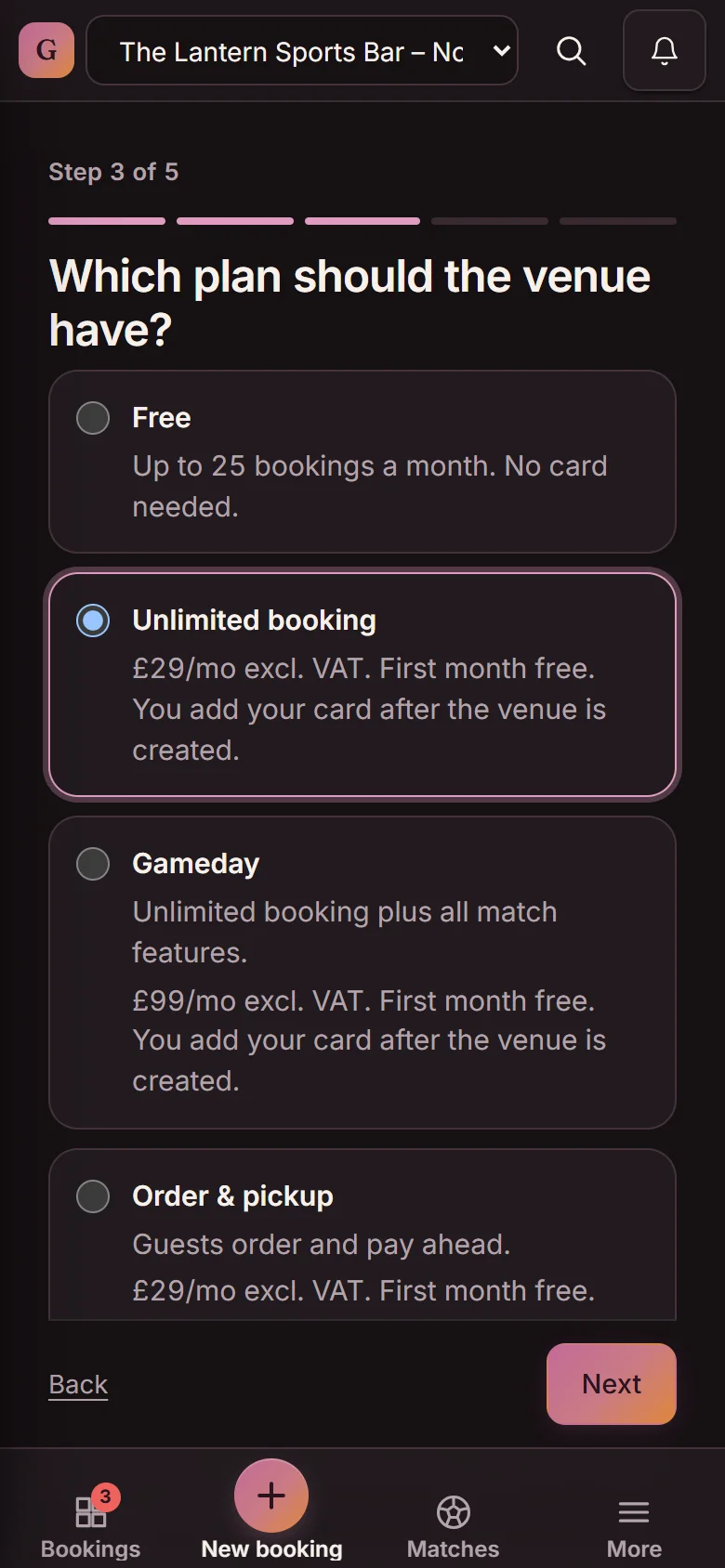
Add a venue, step 3 of 5: Which plan should the venue have? Free up to 25 bookings a month, Unlimited booking £29/mo excl. VAT (selected), Gameday £99/mo excl. VAT and Order & pickup (demo)
Step 3 — each venue gets its own plan. The price is shown before you confirm, and you can change plan at any time.
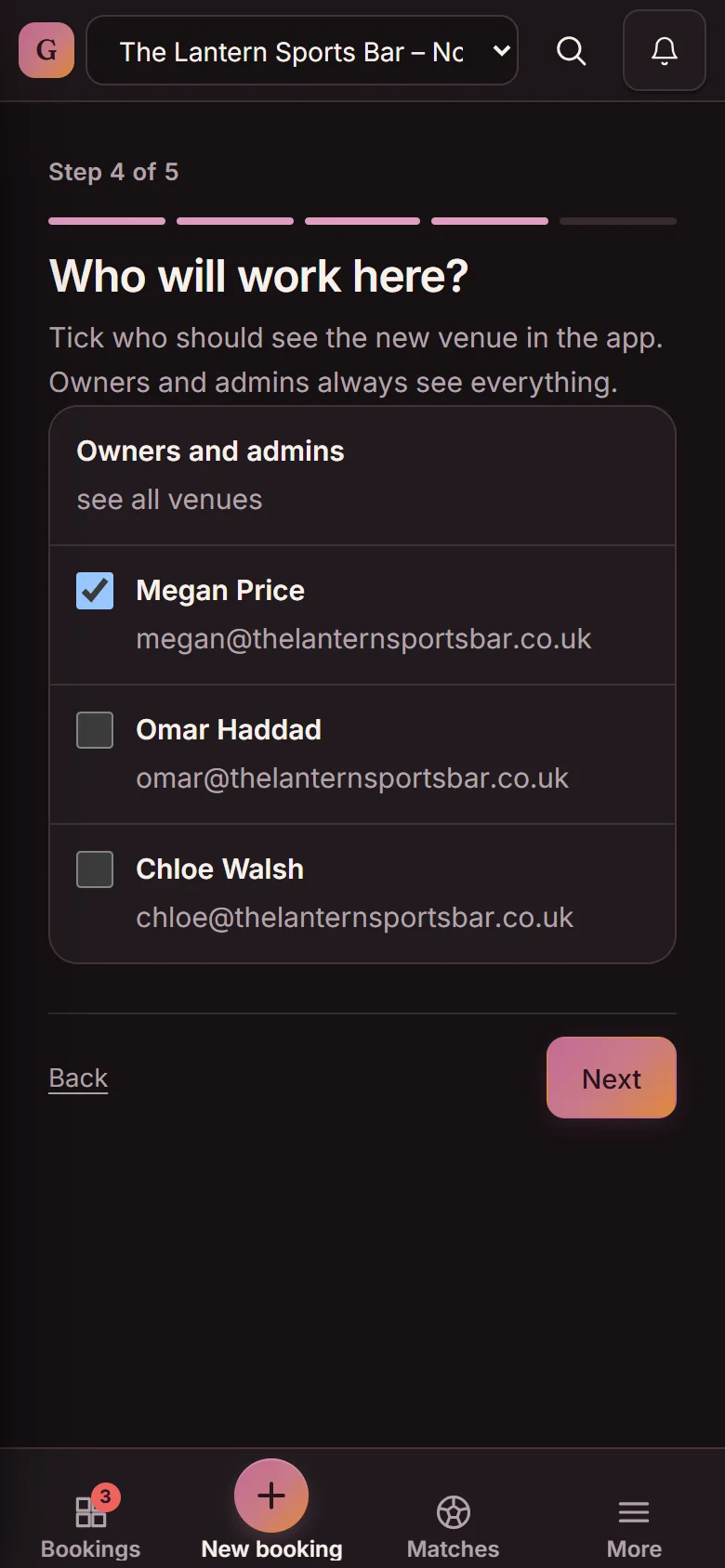
Add a venue, step 4 of 5: Who will work here? Owners and admins see all venues; Megan Price is ticked, Omar Haddad and Chloe Walsh are not (demo)
Step 4 — who will work here? Tick who sees the venue. Owners and admins always see everything.
Start for free You add up to five venues yourself. We set up more together with you.
Staff and guests

Staff see only their venue. Guests are shared.

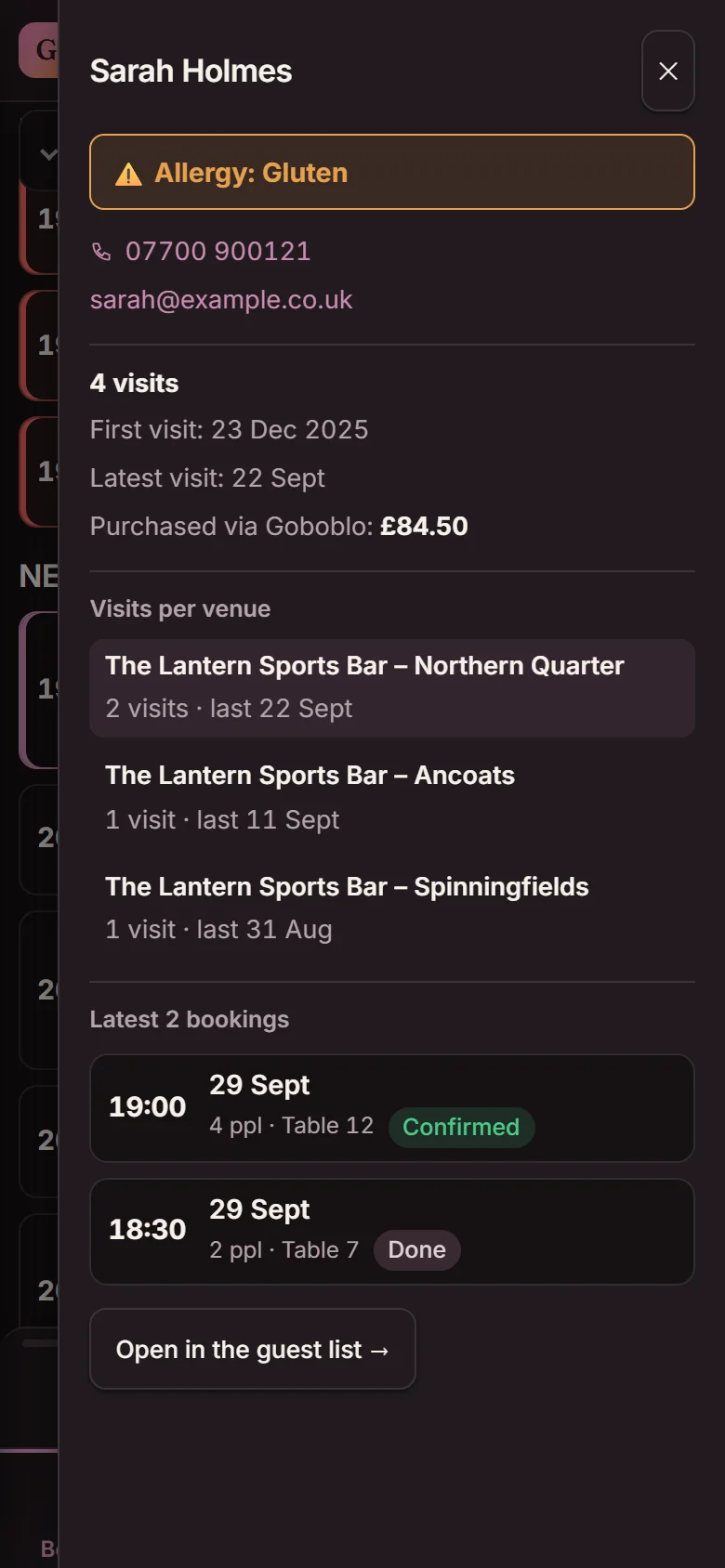
You choose which venues each person sees when you run several venues in one account. They see only those venues' bookings and guests, while owners and admins see everything. The guest database is shared across the account, and the guest profile shows visits per venue. You can send an offer to the guests who visited one venue — see restaurant CRM software.

  • Staff per venue — the rest of the account stays hidden
  • One guest profile, visits per venue
  • Offers to the guests of one venue
Guest profile for Sarah Holmes with a gluten allergy and 4 visits; Visits per venue shows Northern Quarter 2, Ancoats 1 and Spinningfields 1 (demo)
Full at one venue

What happens when a venue is fully booked?

The booking widget shows free times at your other venues when one venue is fully booked, and you move an existing booking to a venue with space. You switch the widget suggestions on under Settings, and the code on your website stays the same.

Move a booking to another venue

Under Edit booking, you move the party to another venue with a free time, and the guest gets a new confirmation. The move stops if the booking was paid into a different bank account, and the app tells you what to do.

  • Free times at the other venue show straight away
  • The “What happens” box says stop before anything goes wrong — otherwise “Nothing stops the move.”
  • A new confirmation in the guest's language
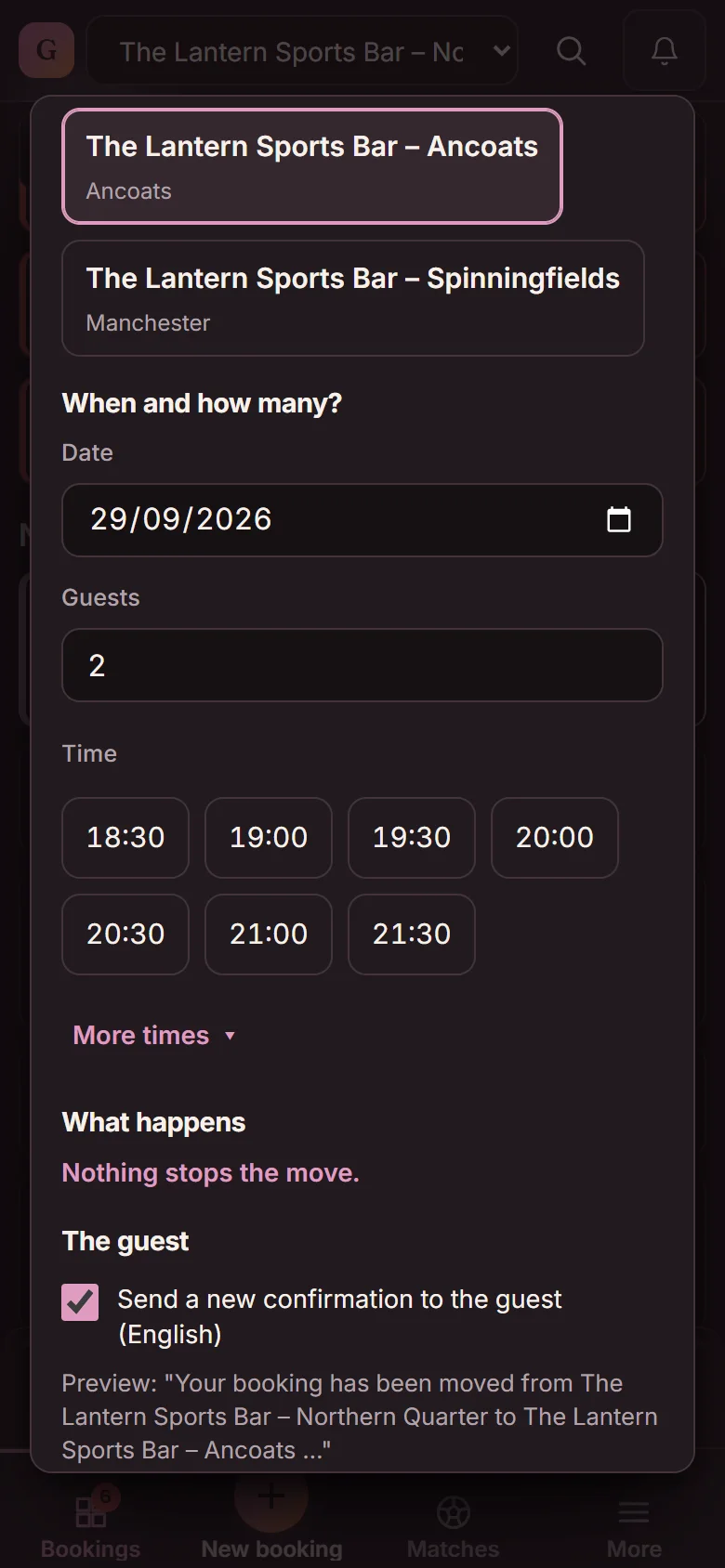
Move the booking to another venue: The Lantern Sports Bar – Ancoats selected and Spinningfields also open, date 29/09/2026, 2 guests, open times and the box What happens: Nothing stops the move (demo)

“Fully booked here” — the guest stays with you

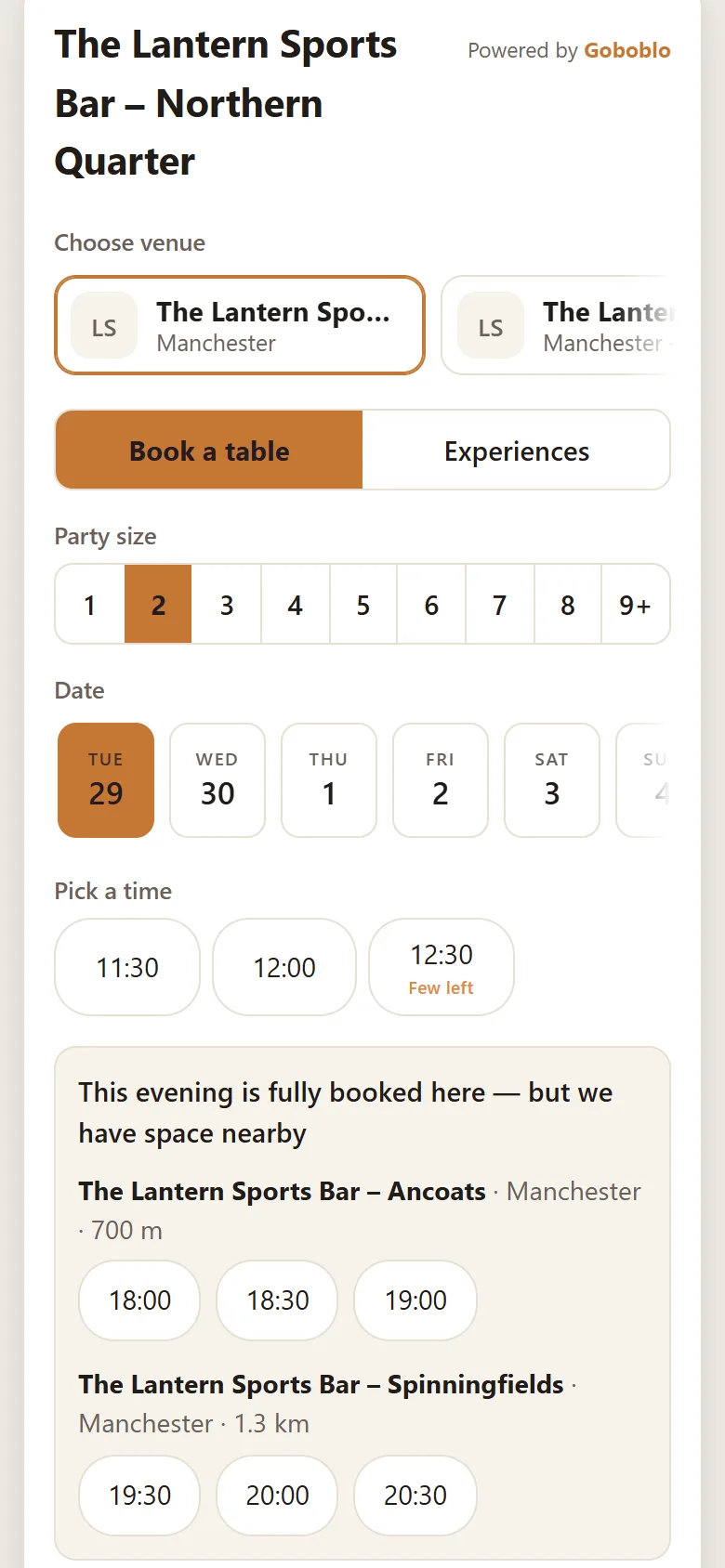
The booking widget suggests free times the same day at your other venues when it's full, and guests see your venues in a picker at the top. The guest books with you instead of going elsewhere. The setting is off by default, and only owners and admins can switch it on.

  • Same code on your website as before
  • Up to four venues, in the order you choose
  • Shows in the booking widget within a minute
The booking widget for The Lantern Sports Bar – Northern Quarter on a phone: Choose venue at the top, and the message This evening is fully booked here — but we have space nearby, with free times at Ancoats (700 m) and Spinningfields (1.3 km) (demo)
Start for free Both are included in Goboblo's restaurant booking system — free up to 25 bookings a month per venue.
Matches

Matches from one main venue

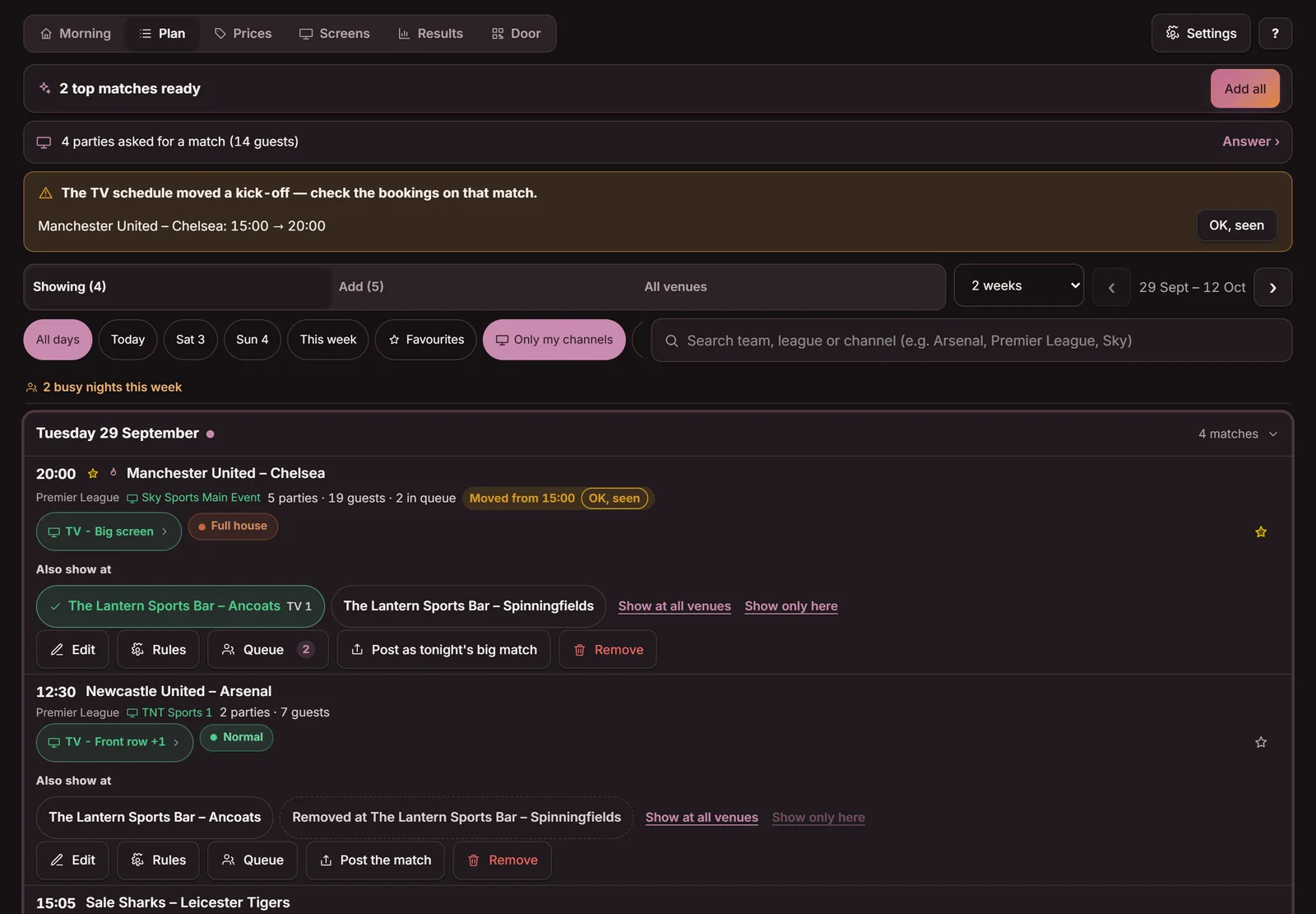
One venue plans the matches, and one tap shows the same match at your other venues. A changed kick-off time follows automatically. Each venue that shows matches needs Gameday or the free tier — see sports bar booking system.

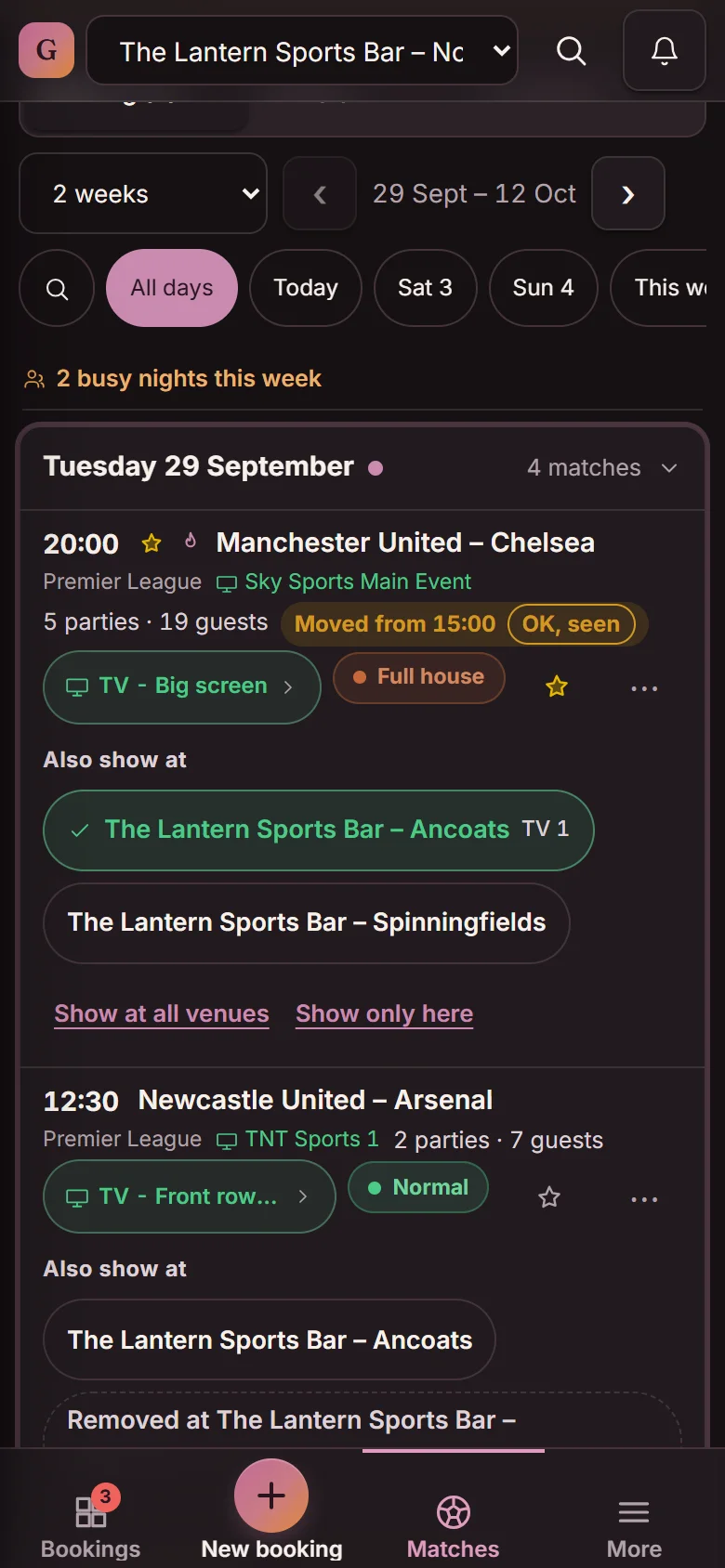
Matches at the main venue Northern Quarter: Manchester United – Chelsea at 20:00 with the Also show at chips for Ancoats and Spinningfields, Show at all venues, and the banner The TV schedule moved a kick-off (demo) The match row on a phone: Manchester United – Chelsea with the Also show at chips for Ancoats and Spinningfields (demo)

On mobile: the match row with the “Also show at” chips

  1. “Also show at”One tap per venue — the match is added there with time, channel and name.
  2. “Show at all venues”One tap for every venue at once.
  3. A moved kick-off followsThe copies at your other venues follow when the TV listings move a kick-off.
  4. The “All venues” tabEvery match against every venue — tap a venue to show or remove the match there.

On a computer you also see the banner when the TV listings move a kick-off, and the “All venues” tab.

Gift cards, stamp cards and money

Gift cards and stamp cards at every venue

Gift cards can work at all your venues, and the money stays with the venue that sold the card. The “Between venues” report shows who owes whom. A digital stamp card for restaurants can also work at every venue, so the stamps add up on one card.

Restaurant gift cards

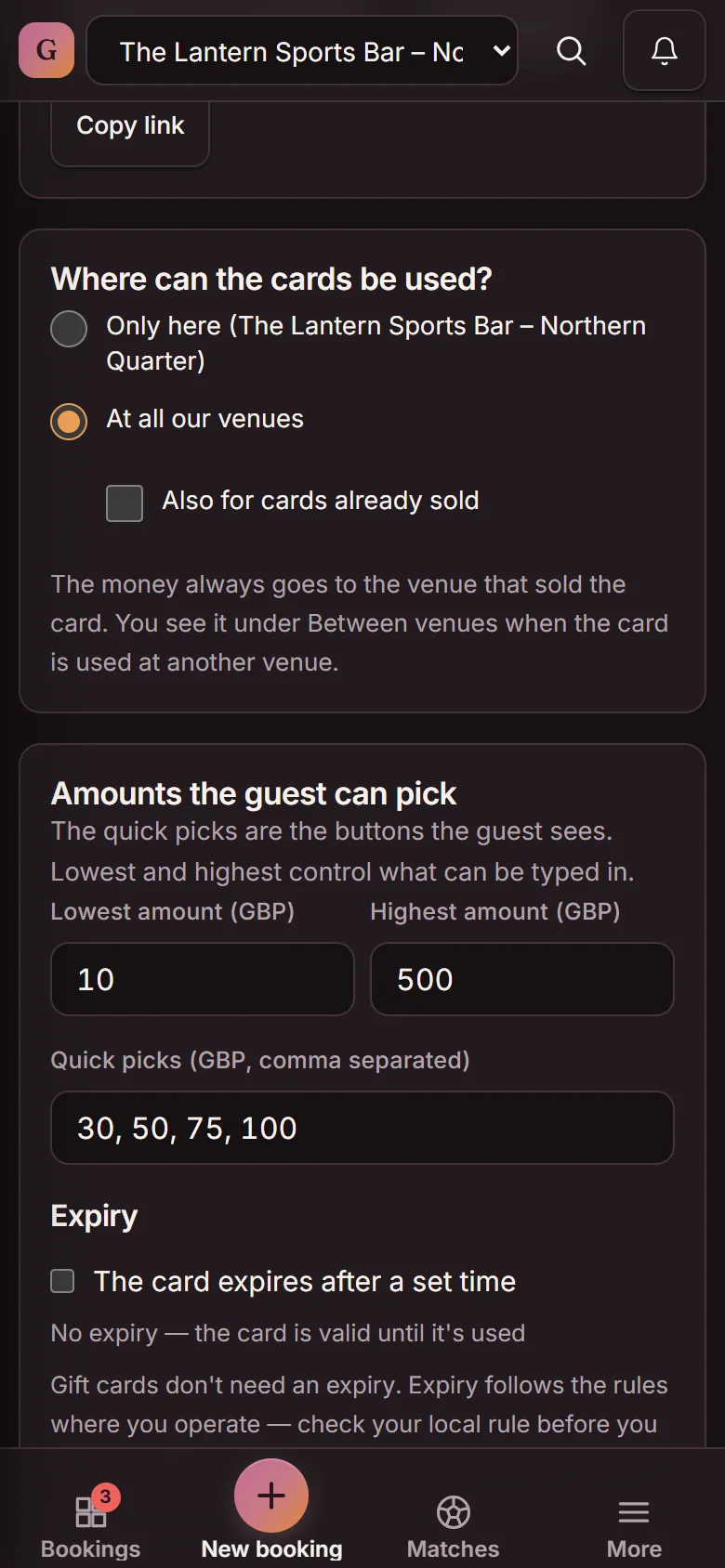
Under “Where can the cards be used?” you pick “Only here” or “At all our venues”. “Only here” is the default.

Gift card settings: Where can the cards be used? Only here or At all our venues (selected), with the note that the money always goes to the venue that sold the card (demo)

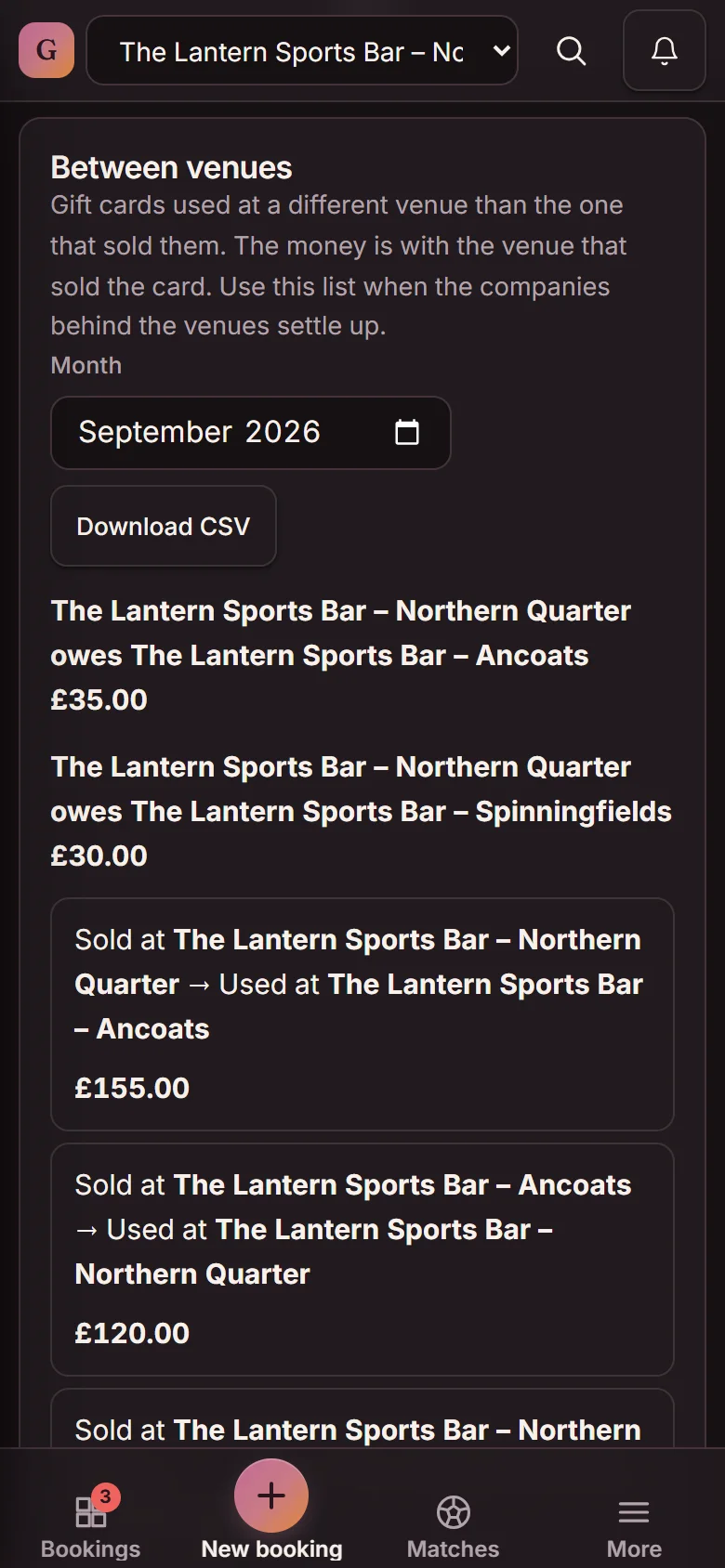
The “Between venues” report

The report lists gift cards used at a different venue from the one that sold them, month by month. You download the list when the companies behind your venues settle up.

The Between venues report for September 2026: Northern Quarter owes Ancoats £35.00 and Spinningfields £30.00, with each card sold at one venue and used at another, and Download CSV (demo)
Own bank account per venueA venue run by its own company gets its own bank account through Stripe. The other venues use your shared payout account.
Pricing

Same price per venue

Every venue pays the same price for its plan, and the free tier of 25 bookings a month applies per venue. The price is locked for as long as you're a customer. Prices exclude VAT — see pricing.

Free

£0
per venue a month
Up to 25 bookings a month. No card, no time limit.
  • Its own booking widget per venue
  • Shared guest database — staff see only their venues' guests
  • Moving bookings and “Fully booked here” included
  • Matches included
Start for free

Gameday

£99
per venue a month, excl. VAT
Unlimited bookings + every match feature, for the venues that show sport.
  • Matches from one main venue
  • Guests pick the match when they book
  • A changed kick-off follows to every venue
Get Gameday

More than five venues? Talk to us

We set them up together with you. Same price per venue.
You add up to five venues yourself in the app.
Book a demo
FAQ

Questions about multiple venues

Does each new venue cost extra?

No. A new venue costs money only when you choose a paid plan for it. One venue can stay on the free tier while another has Unlimited bookings for £29 a month excl. VAT.

Do our venues share guests?

Yes, the guest database is shared across the account. Staff who work at one venue see only the guests connected to that venue.

Do we have to change the code on our website to show our other venues?

No. You switch on “Show our other venues in the booking widget” in the app, and the same code keeps working.

Can each venue be run by a different company?

Yes. Each venue can have its own bank account through Stripe, and gift card money always goes to the venue that sold the card.

What happens if we close a venue?

Booking history, guests and gift cards stay. The plan runs to the end of the period, and you can reopen the venue yourself within 90 days.

Does it work if we only have two or three venues?

Yes. You add your second and third venue yourself in the app, and each venue can stay on the free tier, up to 25 bookings a month.

We have more than five venues. How do we start?

Book a call, and we set up the venues together with you. The price is the same per venue.

Add your second venue tonight

Start with one venue and add the next in five steps — free up to 25 bookings a month per venue.

No card. No contract.

Language and region

Same page in another language. Prices in the local currency.

EnglishUnited States · $EnglishUnited Kingdom · £SvenskaSverige · krNorskNorge · NOKOpens the start pageDanskDanmark · DKKOpens the start pageDeutschDeutschland · Österreich · €Opens the start page