Gameday · for sports bars

Sports bar booking system with match booking

Let guests book the game, not just a table.

Goboblo is a sports bar booking system where you publish the games you show, tie every TV to the right tables and let guests book a seat with a view of their game — booking, floor plan, waitlist and guest profile in one system.

Free up to 25 bookings a month · Gameday £99/mo, excl. VAT · Book a demo

  • Guests pick the game when they book
  • Tables tied to the right screen
  • 0 commission on your own bookings
Watch the video

See a game night with Goboblo

Follow one game night at our example venue, The Lantern Sports Bar, from the morning to the game: the games from the TV schedule, guests booking the game, the card guarantee, the waitlist and the floor live. No sign-up needed.

A category of its own

A booking system built around game night

An ordinary booking system organises date, time, party size and table. Goboblo adds what runs a sports bar: which game the guest wants to watch, which screen the game is on, and which tables have a view of that screen.

  1. Game Manchester United–Arsenal Premier League · Kick-off 20:45
  2. Screen Big screen Sound on · Main room
  3. Tables Tables 10–12 Good view · 18 seats
  4. Booking 4 guests · 20:00 Seat at the big screen
Without a match booking system

When the game request lands in the phone, the inbox and a free-text field

  1. The guest asks“Are you showing the Arsenal game on Saturday?” — by phone, Instagram or Messenger.
  2. Staff replyBack and forth across three different channels, in the middle of service.
  3. The booking is savedAs an ordinary table with a free-text note about which game the party wants to watch.
  4. Game nightStaff have to remember which party should sit in front of which TV.
How it works

From match schedule to the right table

Three steps tie the game you show, the screen it runs on and the table the guest books.

  1. 1

    Put up the games you show

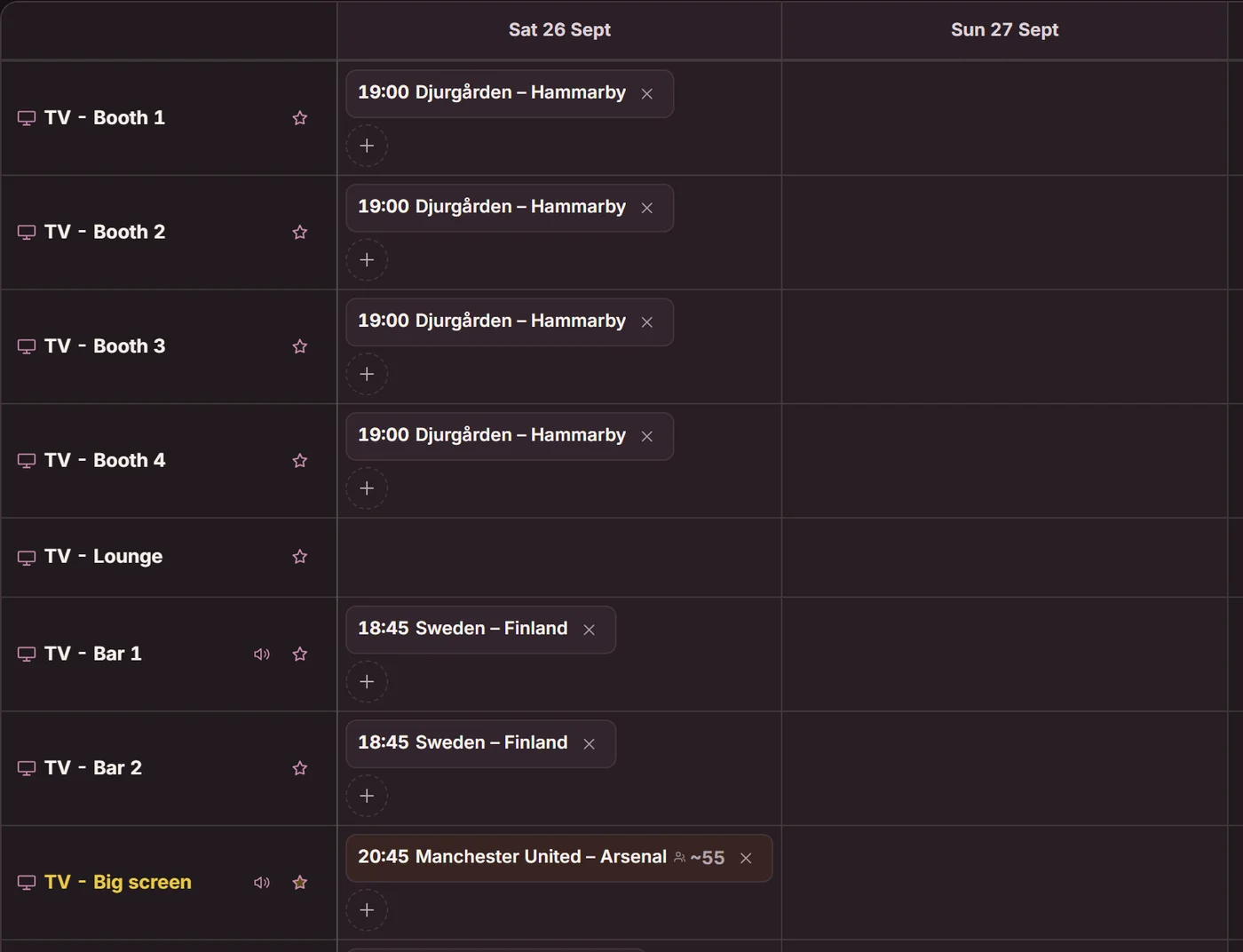
    Choose tonight's games and set the screen, channel and kick-off. Each TV gets its own game list in the floor plan.

    The Matches tab, Screens view: every TV has its own row with the night's games per day
  2. 2

    Tie the game to the screen

    Mark which tables and sections see the screen. Now Goboblo knows which seats have a view of the game.

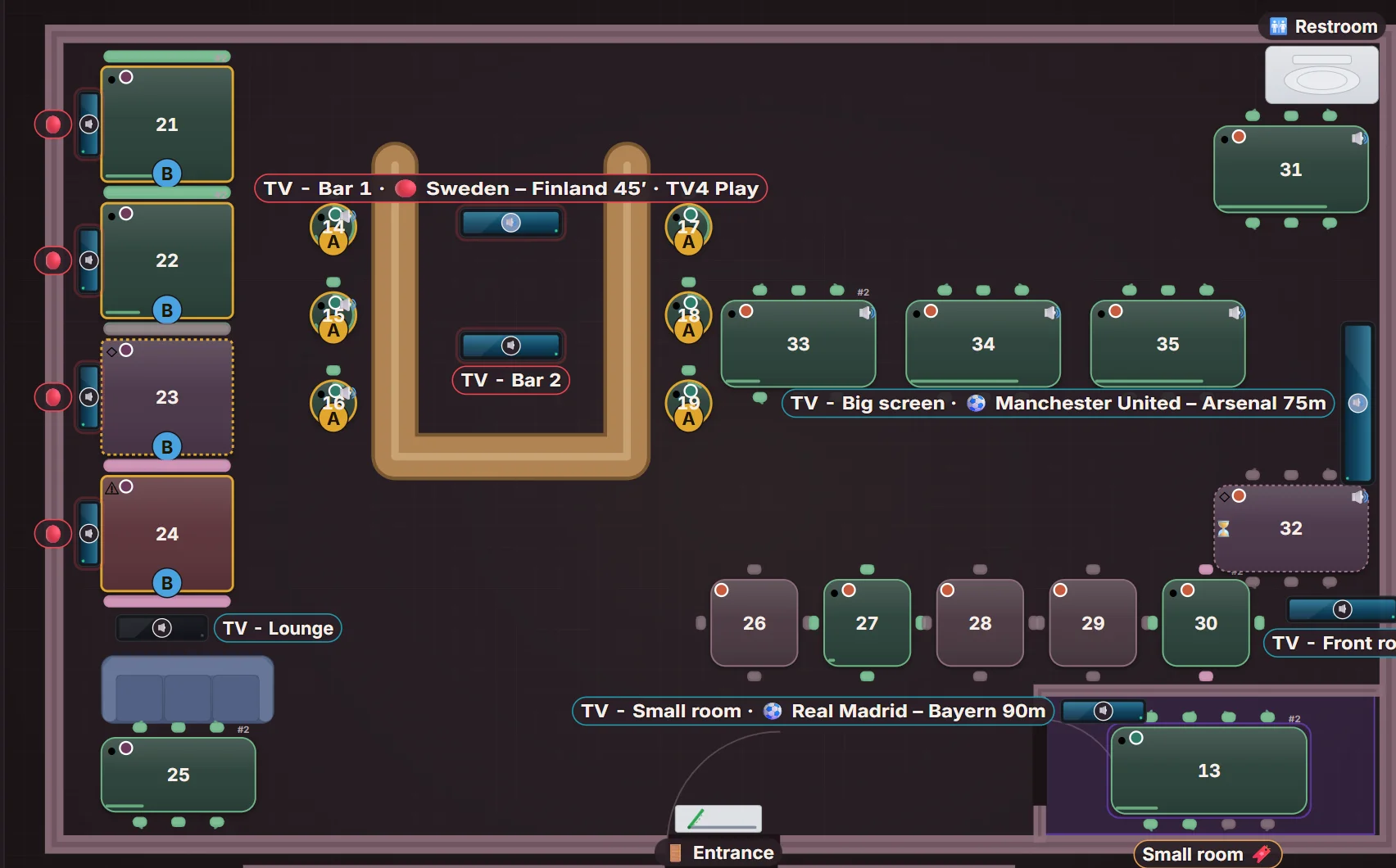
    The floor in Gameday mode: every TV shows its game and the tables are marked by the game they see
  3. 3

    The guest books the right seat

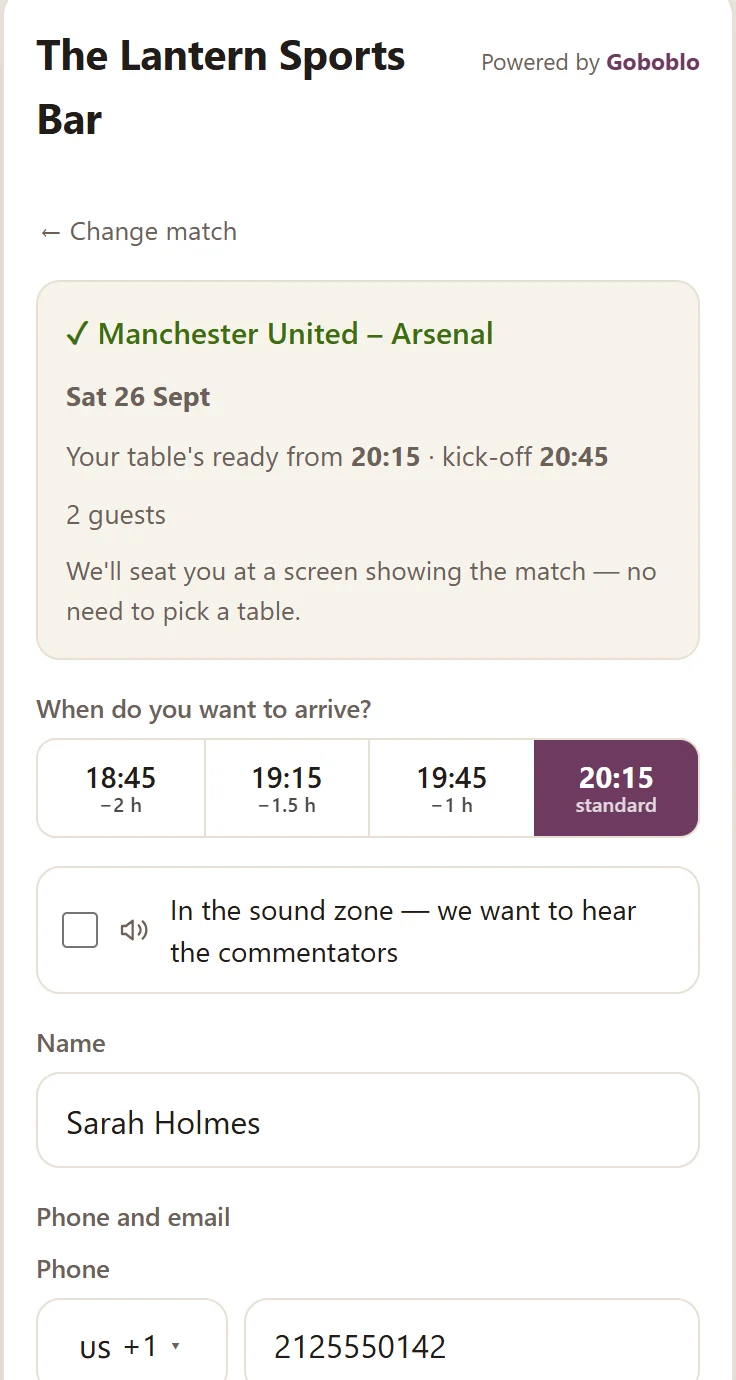
    The guest picks a game in the booking and gets a time and a seat in front of a compatible screen — without guessing which table sees the game.

    The guest's booking in the widget: Manchester United–Arsenal chosen, the table ready from 20:15 ahead of the 20:45 kick-off and a spot at the screen
Screen control

See what every TV shows, right in the floor plan

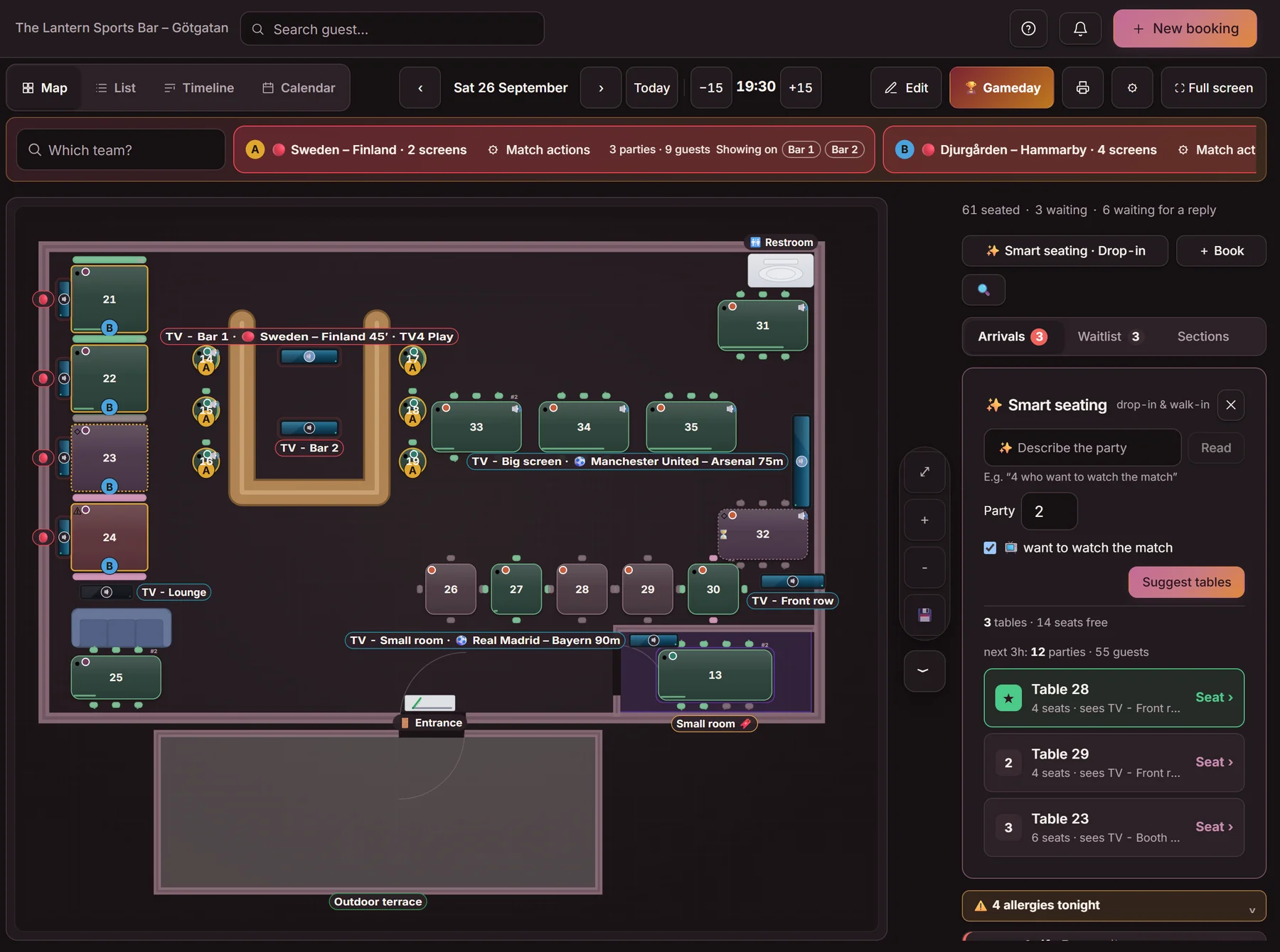
Each screen gets its own game list with title, channel and kick-off. Staff see the night's TV plan on the same map as the tables and bookings — the derby on the big screen, another league at the bar and a third game in a separate section.

The floor in Gameday mode: tonight's games along the top with their screens and booked parties, every TV with its game on the floor plan, tables marked A and B by the game they see, and smart seating on the right 1234
  1. 1
    One or more games per screenEach game shows its screens along the top of the floor view.
  2. 2
    Number of booked parties per game, right in the viewParties, guests and screens per game.
  3. 3
    The same big game on several TVs or zonesTables are marked A, B … by the game they see.
  4. 4
    Smart seating next to the map‘Wants to watch’ suggests tables in front of the right screen.
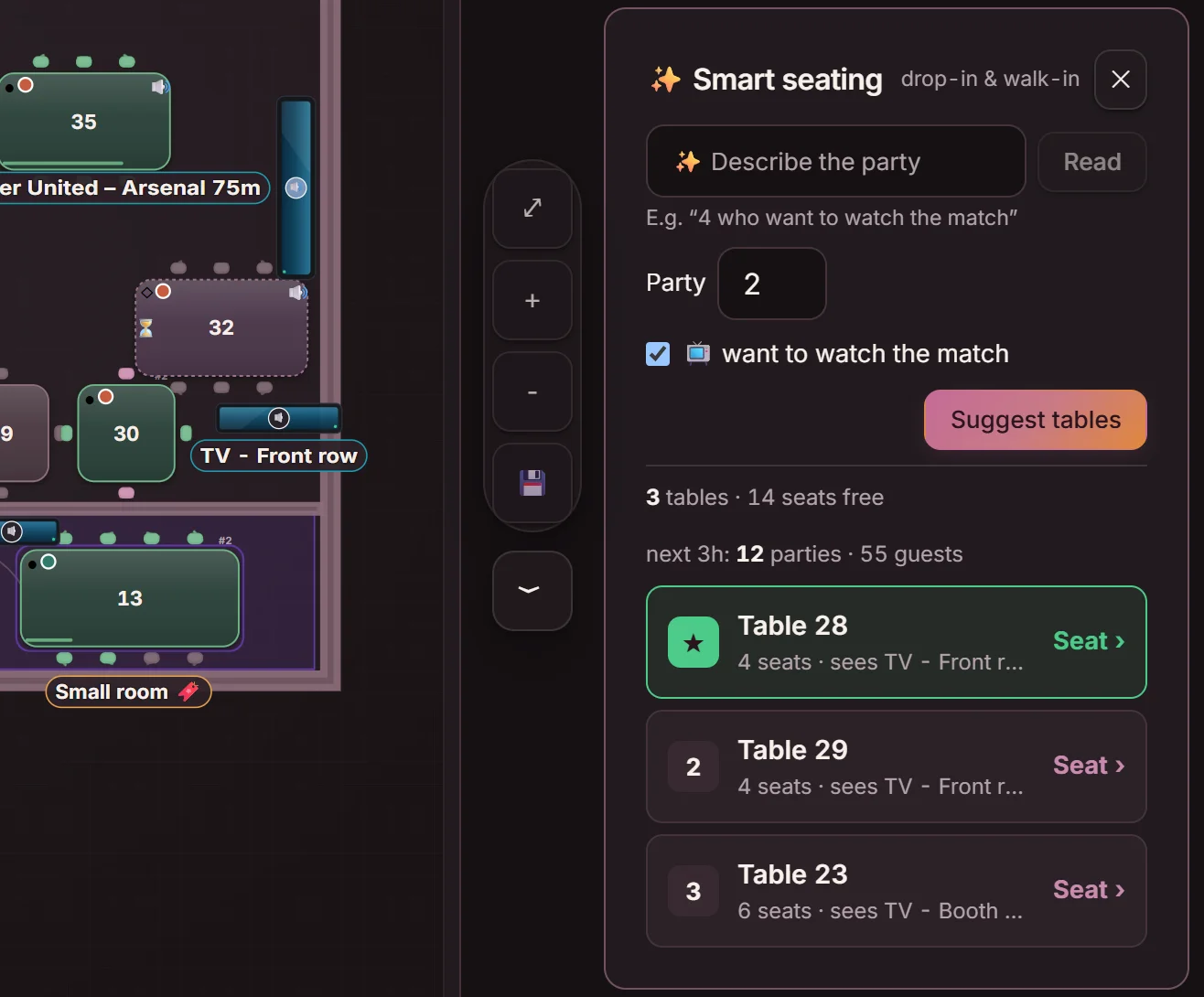
Smart seating next to the floor plan: ‘want to watch the match’ is ticked and the suggestions are tables that see the TV, with Table 28 first
Seats in front of the game

Tie every table to the screen it actually sees

A table can be tied to one or more screens. When a party wants to watch the game, Goboblo suggests a table in front of the right screen in smart seating — so you fill the best seats without guessing.

  • Tables tied to a screen in the floor plan
  • ‘Wants to watch’ seats the party in front of the right TV
  • Grade the view per table, Good or OK – tables with a good view are suggested first
The week's games

Plan the week's games without typing everything from scratch

Goboblo pulls in the TV listings for you in the United States, the United Kingdom, Ireland, Austria, Sweden, Norway and Denmark.

In the Matches tab you see upcoming games a week, two weeks, four weeks or a month ahead, pick the ones you show and put them on the right screen. The week's top games are already picked out — one tap adds them.

No game opens for booking until you've added it, and you can also add a game by hand.

  1. 1Suggest
  2. 2Review
  3. 3Assign screen
  4. 4Publish

TV listings pulled in for

  • United States
  • United Kingdom
  • Ireland
  • Austria
  • Sweden
  • Norway
  • Denmark
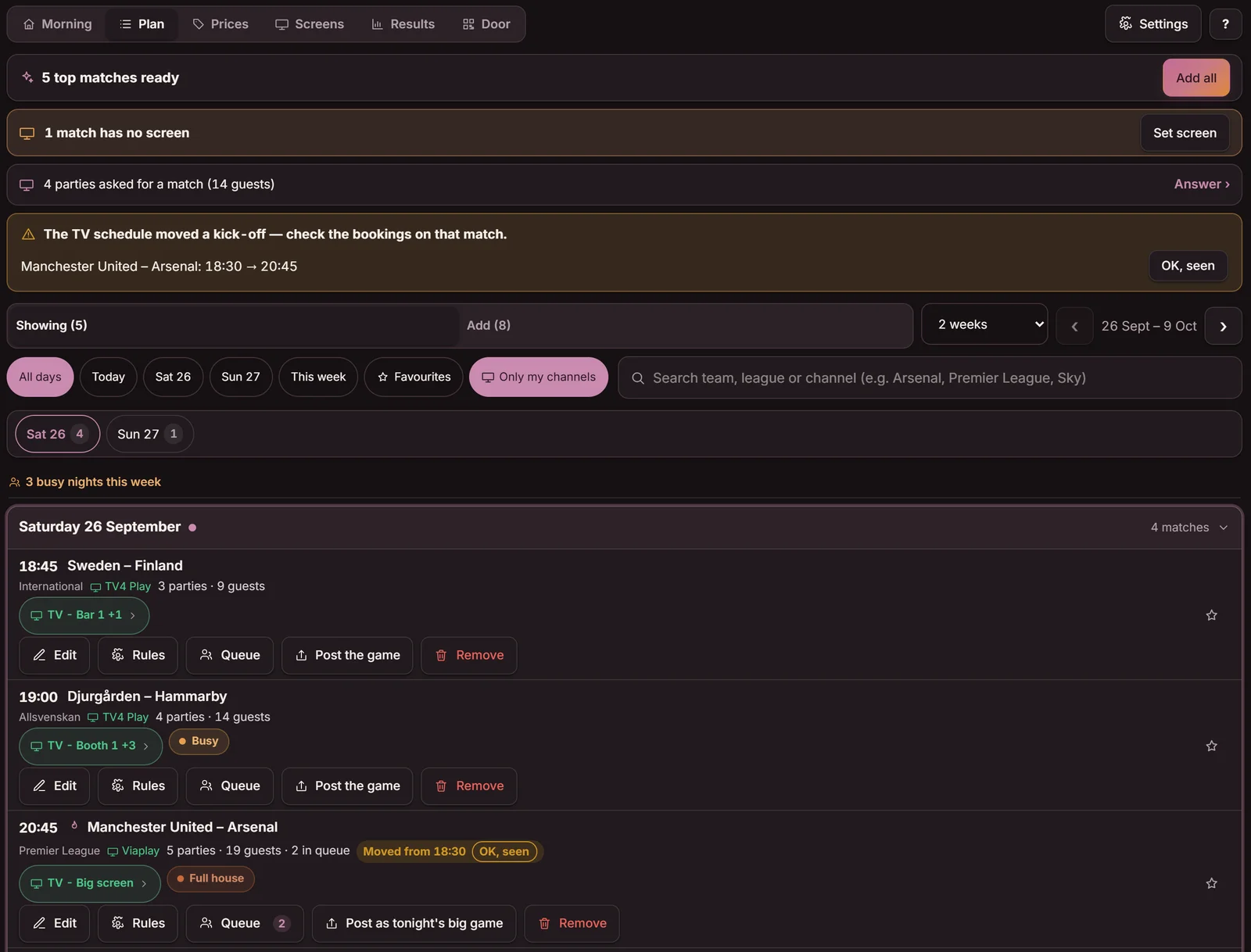
The Matches tab, Plan view: five top games ready with an Add all button, a two-week picker and tonight's games with screen, channel, booked parties and queue
The Matches tab: the week's top games are already picked out — one tap adds them.
Guest booking, in the real widget

The guest picks the game – Goboblo finds a compatible seat

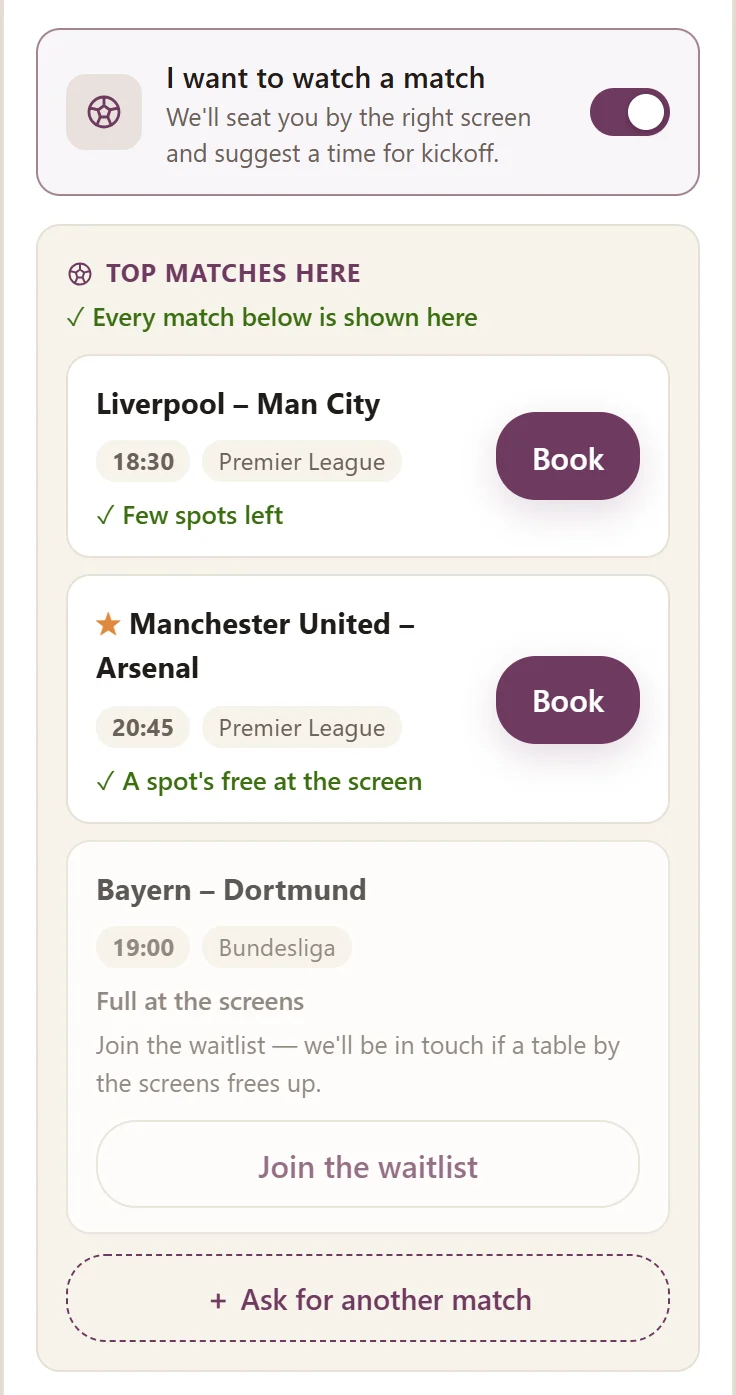
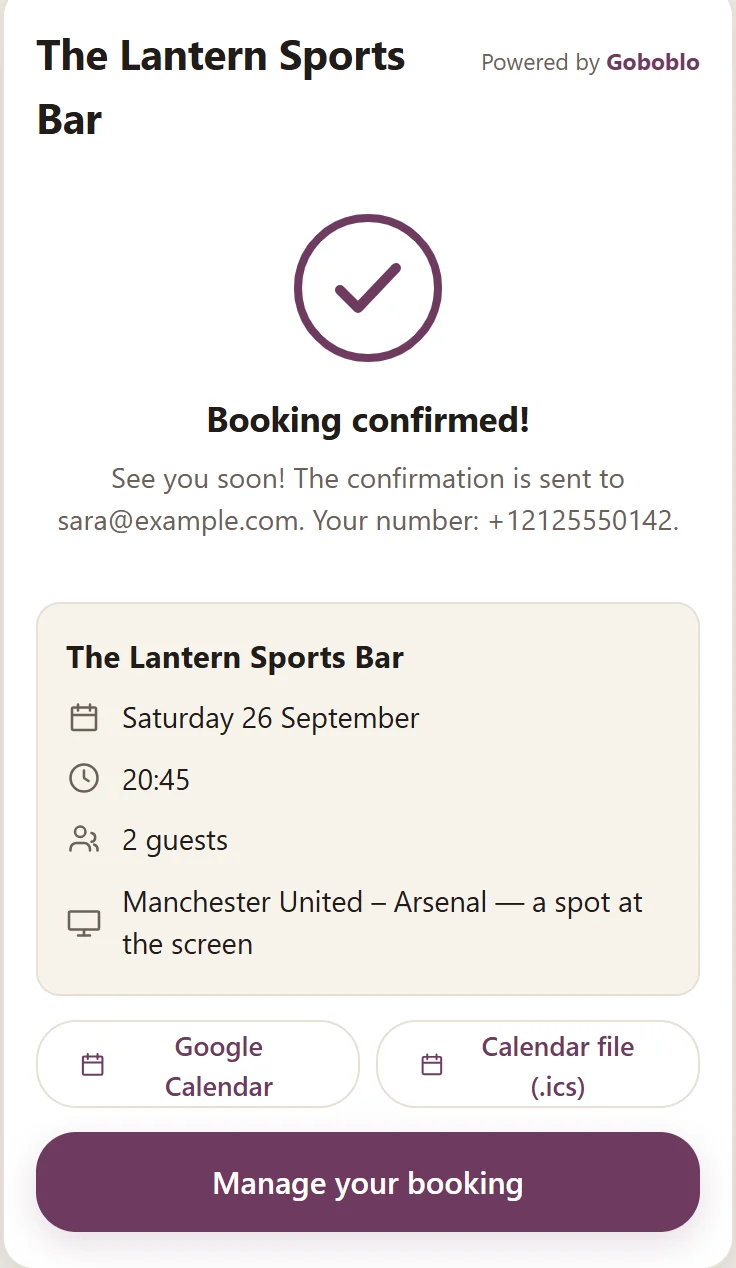
The game choice becomes part of the booking alongside date, time and party size. The time locks to kick-off, and the guest doesn't pick an exact table — you seat the party in front of a screen showing the game.

  1. Step 1 in the widget: ‘I want to watch a match’ switched on and tonight's top games with kick-off, league, seats left and a waitlist when the screens are full

    1‘I want to watch a game’ unfolds tonight's games

  2. Step 2 in the widget: Manchester United–Arsenal chosen, arrival times counted from kick-off and a spot at the screen

    2The time counts from kick-off — guests choose when they arrive

  3. Step 3 in the widget: booking confirmed with date, kick-off, party size and Manchester United–Arsenal — a spot at the screen

    3A seat at the right screen — the guest doesn't pick a table

Try it

Pick a game – see where Goboblo seats you

Choose the game, party size and when you'll arrive. The floor plan highlights the right screen and the tables that see the game. The time locks to kick-off and you don't pick a table – Goboblo seats you in front of a screen showing the game.

1. Which game do you want to watch?
2. Party size
4 guests
3. When will you arrive?

Try the full booking flow in the widget

Big screen TV Bar 1 TV Bar 2 TV Lounge 10 6 seats 11 4 seats 12 8 seats 1 4 seats 2 6 seats 3 4 seats 4 4 seats 5 6 seats 6 8 seats 20 6 seats 21 4 seats
The whole game night

From kick-off to the next derby – in one system

The whole floor, live

Bookings, walk-ins and waitlist on one floor plan

The floor plan shows which parties are seated, which bookings are on the way and which guests are waiting for a seat. Staff run the whole game night without switching between separate lists.

  • Green tables seated, late tables flagged
  • The waitlist shows who's next in line
  • Tables keep turning when everyone arrives at half-time
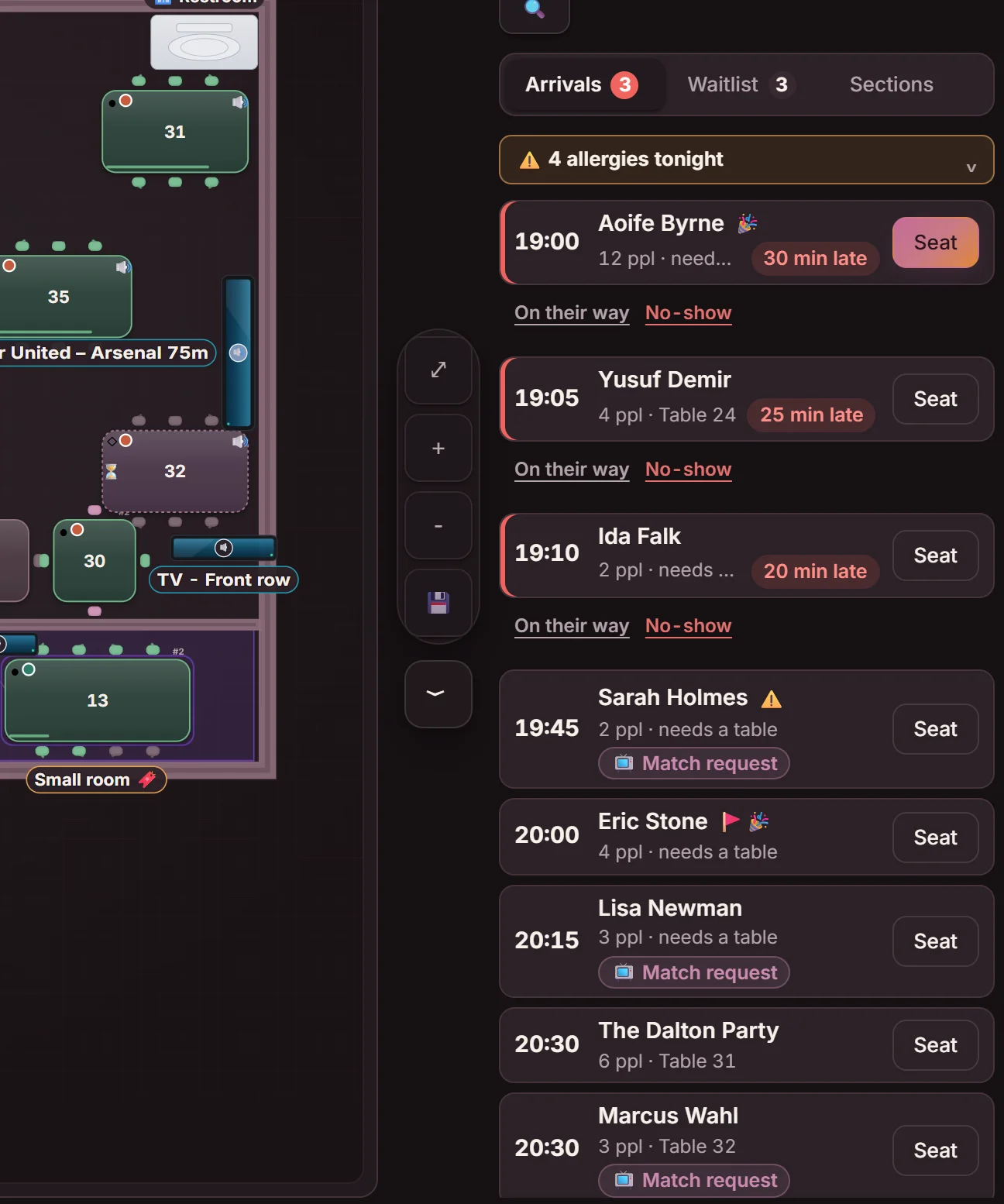
The floor plan on a game night with the arrivals list beside it: late parties with On their way and No-show, guests with a match request and tables to seat them at
Match queue

Offer the right free seat to the right waiting guest

The waitlist is tied to the game. A guest waiting for the derby queues for that specific game, and staff offer a seat from the queue — Goboblo only shows tables with a view of the right screen. If you switch on automatic offers, an offer goes by email to the next guest in the queue for the same game when a match booking is cancelled.

No-show protection

Fewer empty tables in front of the most sought-after screens

Confirmations and reminders make it easy for the guest to confirm or cancel. When a table frees up, staff can offer it to the waitlist — so the prime seats in front of the big screen don't sit empty at kick-off.

  • Automatic confirmation and reminder by email (or text if you switch it on)
  • The guest confirms or cancels in one tap
  • Match rules per game: seating time, card guarantee and minimum spend – shown and confirmed at booking
Match night packages

Sell the table and the food in one booking

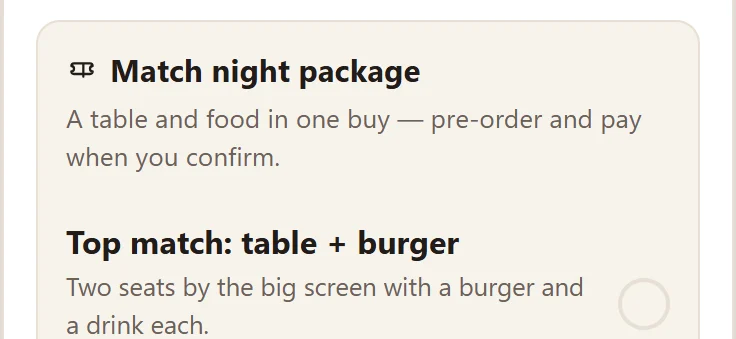
Build a package for one game, a league, a team or every game — say two seats by the big screen with a burger and a drink each. The guest picks the package when booking the table and pays straight away, so the food is already sold before they walk in.

  • Packages per game, league, team or for every game
  • You set what's included, the price and the number of seats
  • The guest pays by card in the booking, and the money goes to your account
  • 0.5% per package sold, plus the card fee — no monthly cost
A match night package in the booking: Top match, table and burger — two seats by the big screen with a burger and a drink each
What the package looks like for the guest in the booking.
Returning supporters

See which games bring the guest back

Every completed booking updates a guest profile you own. The guest profile shows which teams the guest follows, drawn from past match bookings. With the right consent you can filter your messages by team or league and reach supporters ahead of the right game — without paying commission for a relationship you already have.

Get started

Set the venue up once – use it every game night

  1. 1Add tables and sections

    Create or import the venue's floor plan in the live view.

  2. 2Add the screens

    Place TVs and projectors on the same map as the tables.

  3. 3Tie tables to screens

    Set which seats see each screen.

  4. 4Publish the games

    Choose the week's games and open them for booking in the widget.

The first customers get a personal setup of their first game night.

Book a setup of your first game night
Standalone and connected

Use Goboblo as your booking system – connect more when you need it

Goboblo runs as the sports bar's own booking system with no link to a till or staff rota. You add integrations where they give clear value in the day-to-day.

Works standalone
  • Booking and floor plan
  • Game choice and screen control
  • Waitlist
  • Guest profiles
Can connect to
  • Your website and Google profile
  • Email and text
  • Calendar
  • TV listings (US, GB, IE, AT, SE, NO, DK)
Planned
  • POS and payments
  • Digital signage and AV
  • External booking systems
  • Match guides and sports-bar finders
Pricing

Start for free – one system for every game night

You start for free: up to 25 bookings a month per venue, matches included — no card, no time limit. To go unlimited and keep the matches, take Gameday for £99 a month per venue, excl. VAT. The first month is free and the price is locked.

Start for free £0 up to 25 bookings/month per venue
  • Everything to try — match choice, screen control and floor plan
  • Waitlist and reminders
  • Guest profiles
  • No card, no time limit
Start for free
Gameday £99/mo unlimited bookings + every match and TV · excl. VAT
  • Unlimited bookings
  • The TV listings for your country and the matches on your screens
  • Guests book the match, a match queue – and a text when a table with a view opens up if you switch texts on (£0.10 each, excl. VAT)
  • Match rules, favourite teams and posters
  • First month free, price locked
Try a month free

Only want bookings, without the matches? Unlimited booking is £29 a month, excl. VAT. No fee per guest. See full pricing.

Pilot

Built with sports bars

We're building Goboblo Gameday with the first sports bars. Real results and case studies will be published here once the pilots have run their first game nights — we'd rather show real numbers than promises.

Want to be one of the pilots? Book a demo.

FAQ

Questions sports bars ask

What is a sports bar booking system?

A sports bar booking system takes table bookings online, shows a live floor plan and handles the waitlist and walk-ins on game nights. Goboblo adds what a sports bar needs: you choose which games are shown, tie every TV to the right tables and let guests pick a game when they book. The core is the same as a restaurant reservation system.

How does a guest pick which game to watch?

In the booking the guest ticks “I want to watch a game” and picks a game from tonight's list, with teams, kick-off and channel. The time locks to kick-off. The guest doesn't pick an exact table — Goboblo seats the party in front of a screen showing the game.

Does the guest have to pick an exact table?

No. By default the guest picks a game and a time, and Goboblo suggests or assigns a table in front of the right screen. You decide per venue whether the guest can also choose a table, pick a section, or just choose a game and time.

How are tables tied to TV screens?

In the floor plan you put the game on a screen and mark which tables see it. That link is then used when match bookings are seated and when available seats are shown to the guest — so you fill the best seats without two parties landing at the same table in front of the big game.

Can several games be shown at once?

Yes. Each screen keeps its own game list. Run the derby on the big screen, another league at the bar and a third game in a separate section. The floor plan shows which game is on which screen and how many parties are booked for each game.

Are the games pulled in automatically?

Yes. Goboblo pulls in the TV listings for you in the United States, the United Kingdom, Ireland, Austria, Sweden, Norway and Denmark. In the Matches tab you see upcoming games a week, two weeks, four weeks or a month ahead, pick the ones you show and put them on the right screen. The week's top games are already picked out — tap Add all and they're in. No game opens for booking until you've added it, and you can also add a game by hand.

Which sports and countries are supported?

You can add any game by hand — any sport, league or country. In the United States, the United Kingdom, Ireland, Austria, Sweden, Norway and Denmark, Goboblo also pulls in the TV listings for you, so upcoming games are ready to pick. In other countries you add the games yourself.

Does Goboblo work without a POS integration?

Yes. Goboblo runs as the sports bar's own booking system with no link to a till or staff rota — booking, floor plan, game choice, screen control, waitlist and guest profiles are included. You can connect more systems when you need them.

Can I use Goboblo on my existing website?

Yes. You embed the booking widget on your own website or put a booking link in your Google profile and social channels. Guests book directly with you. No website? You can make a free website in Goboblo at an address like your-restaurant.goboblo.site, with the matches, the menu and booking on it. Your own domain is £25 a month, excl. VAT.

How are cancellations and the waitlist handled?

Every booking gets an automatic confirmation and a reminder by email (or text if you switch it on), with a link where the guest confirms or cancels in one tap. If you switch on automatic offers, an offer goes by email to the next guest in the queue for the same game when a match booking is cancelled, with a view of the right screen. See the guide on reducing no-shows.

Does it save the guest's favourite team?

Yes. Every completed booking updates a guest profile you own — past visits, party size, notes and consents. The guest profile also shows which teams the guest follows, drawn from their past match bookings. With the right consent you can filter your messages by team or league and reach supporters ahead of the right game.

What does a sports bar booking system cost?

You start for free: up to 25 bookings a month per location, matches included — no card, no time limit. To go unlimited and keep the matches, take Gameday: £99 a month per venue, excl. VAT, with the first month free and the price locked. That gives you the TV listings for your country, the matches on your screens, guests picking their match when they book and the match queue. If you switch texts on, staff can also send a text when a table with a view opens up, at £0.10 per text, excl. VAT. If you only want bookings, without matches and TV, unlimited booking is £29 a month, excl. VAT. You pay 0 commission on your own bookings and no fee per guest. See pricing.

Can a sports bar chain use Goboblo?

Yes. Several venues use the same system at the same price per location, each with its own floor plan, screens and games. To see how it works for a group or chain, book a demo.

Plan your next game night in Goboblo

Show us the venue, the screens and the games you usually broadcast. We'll show how the booking ties to the right TV and the right table.